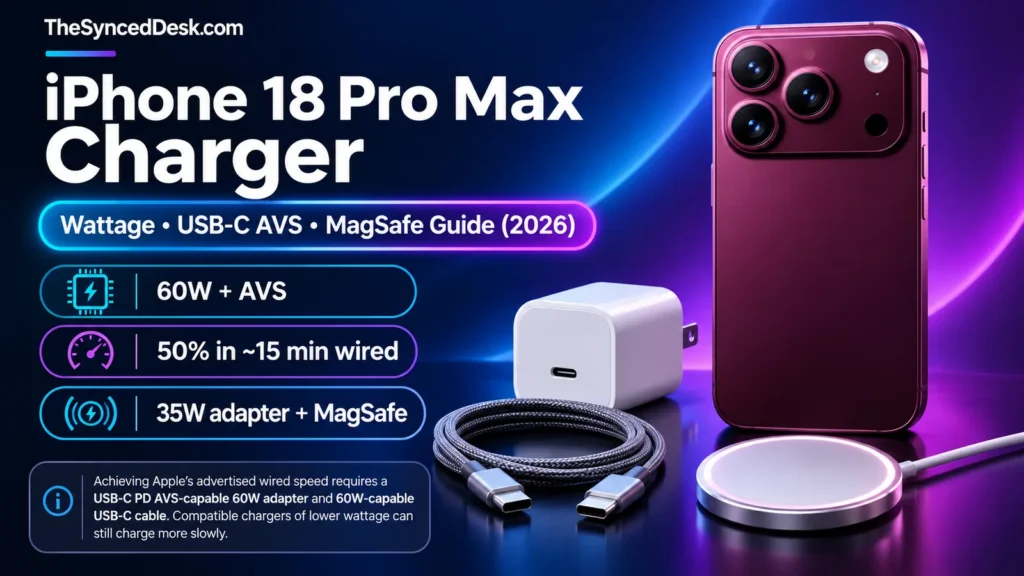
Choosing the right iPhone 18 Pro Max charger isn’t just about buying the adapter with the highest wattage. Apple’s 2026 Pro models introduce faster wired charging, but reaching the advertised speed requires the correct charging technology.
For the fastest wired charging, Apple recommends a 60W-capable or higher USB-C power adapter with Adjustable Voltage Supply (AVS), paired with a 60W-capable USB-C cable. This setup can charge an iPhone 18 Pro Max to approximately 50% in 15 minutes under Apple’s test conditions.
For wireless charging, the phone supports MagSafe and Qi2 at up to 25W. Apple’s fastest MagSafe charging claim requires a compatible MagSafe Charger and a 35W or higher power adapter.
The good news is that you don’t necessarily need to replace your existing USB-C charger. A compatible lower-wattage adapter can still charge the phone, although it may be slower.
In this guide, The Synced Desk explains the correct wattage, what AVS means, whether older chargers work, what’s included in the box, and how to avoid buying an adapter that doesn’t deliver the speed you expect.
Table of Contents
Quick Answer: What Charger Does the iPhone 18 Pro Max Need?
For Apple’s fastest advertised charging speeds, use the following combinations.
| Charging method | Recommended equipment | Apple’s advertised result |
|---|---|---|
| Fastest USB-C wired | 60W-capable or higher USB-C adapter with AVS and suitable cable | Up to 50% in around 15 minutes |
| Apple Dynamic Power Adapter | 40W Dynamic Power Adapter with 60W Max and USB-C cable | Up to 50% in around 15 minutes |
| Fastest MagSafe | Compatible MagSafe Charger with 35W+ USB-C adapter | Up to 50% in around 30 minutes |
| MagSafe / Qi2 wireless | Compatible wireless charging equipment | Up to 25W supported |
| Older USB-C adapter | Compatible 20W, 30W or other lower-power adapter | Charging works, but may be slower |
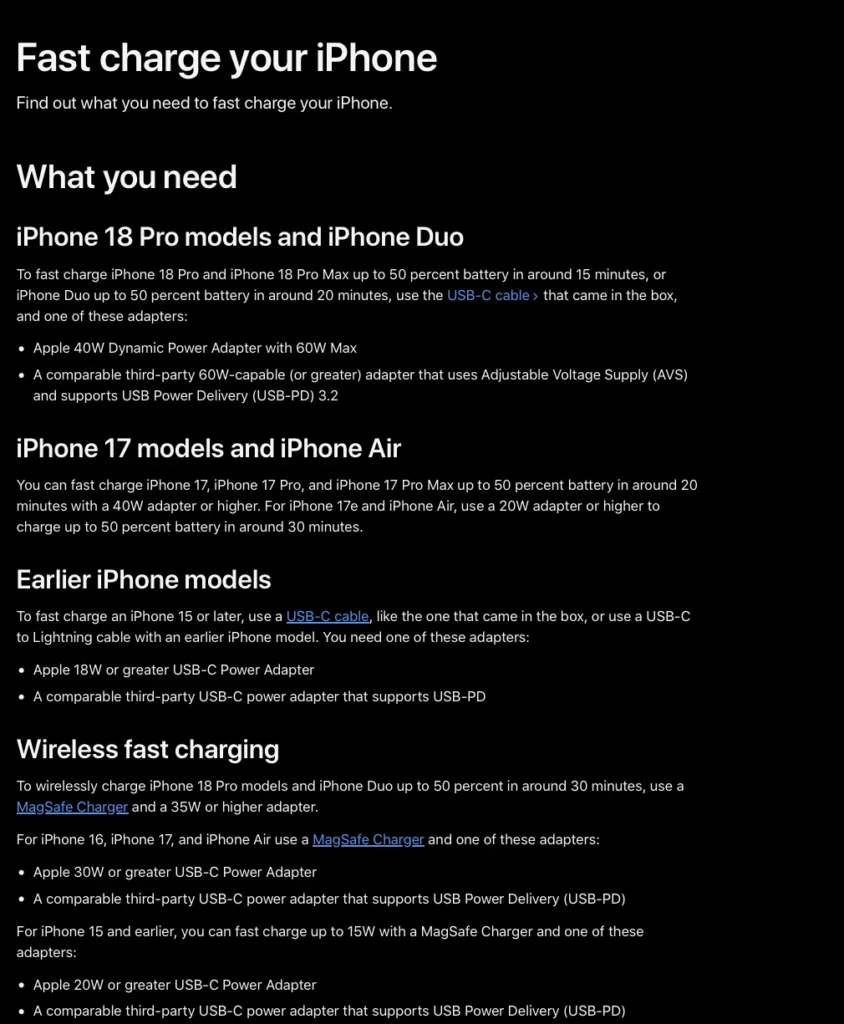
These are Apple’s published compatibility specifications and charging claims, not independent charging tests performed by The Synced Desk.
Important: A charger’s advertised wattage is its power-delivery capability, not the amount of electricity the phone continuously draws.
Apple’s support guidance explains the conditions required to achieve its fastest advertised rates.
Source: Apple Support: Fast Charge Your iPhone.
Does the iPhone 18 Pro Max Come With a Charger?
No. Apple does not include a wall power adapter with the iPhone 18 Pro Max.
According to Apple’s official technical specifications, the box contains:
- iPhone 18 Pro Max.
- USB-C Charge Cable, 1 meter.
The cable supports fast charging and works with compatible USB-C power adapters.
Apple does not include EarPods or a separate charging brick.
Do you need to buy a charger separately?
Only if you don’t already have an appropriate USB-C power adapter.
For example, if you already own a genuine, functioning USB-C adapter from a recent iPhone, iPad, or MacBook, it may be compatible.
However, compatibility and maximum charging speed are two different things.
A compatible 20W adapter can provide power without necessarily achieving the iPhone 18 Pro Max’s fastest charging performance.
If you want the advertised 15-minute result, check that your adapter meets Apple’s specific AVS requirements.
What Wattage Charger Is Best for iPhone 18 Pro Max?
For maximum wired charging speed, choose a 60W-capable USB-C adapter with Adjustable Voltage Supply.
Apple specifically recommends its own 40W Dynamic Power Adapter with 60W Max or an appropriately specified third-party alternative.
This distinction matters because wattage alone doesn’t tell you everything about charging compatibility.
Can you use a 20W charger?
Yes, provided it is a compatible, safe USB-C adapter.
A 20W adapter can charge the iPhone 18 Pro Max, but it won’t achieve the same maximum rate as Apple’s recommended 60W-capable AVS setup.
If you normally charge overnight and aren’t concerned about speed, replacing a working 20W adapter may be unnecessary.
Can you use a 30W charger?
Yes. A compatible 30W USB-C adapter can charge the phone.
However, it does not meet Apple’s published requirements for the fastest 15-minute wired charging result.
Can you use a 40W charger?
Yes, but the adapter’s technical capabilities matter.
Apple’s 40W Dynamic Power Adapter with 60W Max can dynamically provide up to 60W and supports AVS.
That makes it different from an ordinary adapter limited to a maximum output of 40W.
Don’t assume every charger labeled 40W provides the same fast-charging performance.
Can you use a 65W USB-C charger?
Potentially, yes.
A quality 65W USB-C charger may be suitable, but only if it supports the appropriate USB Power Delivery and AVS capabilities.
A 65W rating by itself does not guarantee Apple’s fastest charging speed.
Check the adapter’s published technical specifications instead of relying on the large wattage number printed on the packaging.
What Is AVS, and Why Does iPhone 18 Pro Max Need It?
AVS stands for Adjustable Voltage Supply.
It is a power-delivery capability that lets compatible devices and adapters negotiate supported voltage levels more precisely.
This helps the charging system deliver power according to the device’s requirements.
Apple uses AVS as part of the fastest wired-charging specification for the iPhone 18 Pro and iPhone 18 Pro Max.
Why isn’t an ordinary 65W charger always enough?
Two adapters can advertise the same maximum wattage while supporting different charging protocols.
One may support the AVS capability required by the iPhone’s fastest charging mode.
Another may provide conventional USB-C Power Delivery without the appropriate AVS support.
Both may charge the phone successfully, but they won’t necessarily provide identical charging speeds.
Is AVS the same as PPS?
No.
Programmable Power Supply (PPS) and Adjustable Voltage Supply (AVS) are distinct USB Power Delivery capabilities.
A charger advertising PPS does not automatically guarantee that it supports the AVS mode Apple specifies.
When shopping for a third-party adapter, look for explicit AVS support and compatibility with Apple’s fast-charging requirements.
Apple’s consumer support documentation identifies USB-PD compatibility and AVS requirements for comparable third-party adapters. Its testing notes also identify the supported USB-PD generation and cable capability.
For the most current wording, refer to Apple’s official fast-charging requirements.
Apple 40W Dynamic Power Adapter With 60W Max Explained
Apple’s charger name can be confusing at first.
How can an adapter be called 40W and still provide 60W?
The name reflects its Dynamic Power design.
Apple explains that the adapter can dynamically provide up to 60W under supported conditions.
It also includes AVS support.
That combination makes it an official compatible option for the iPhone 18 Pro Max’s fastest advertised wired charging.
Does Apple require you to buy its own adapter?
No.
Apple permits compatible third-party power adapters that meet the applicable power-delivery requirements and relevant safety standards.
The practical advantage of Apple’s own adapter is that Apple explicitly identifies it as a supported option.
With a third-party charger, you should independently check its specifications.
Avoid confusing a charger rated for 60W with a charger that supports Apple’s required 60W-capable AVS charging mode.
How Fast Can iPhone 18 Pro Max Charge?
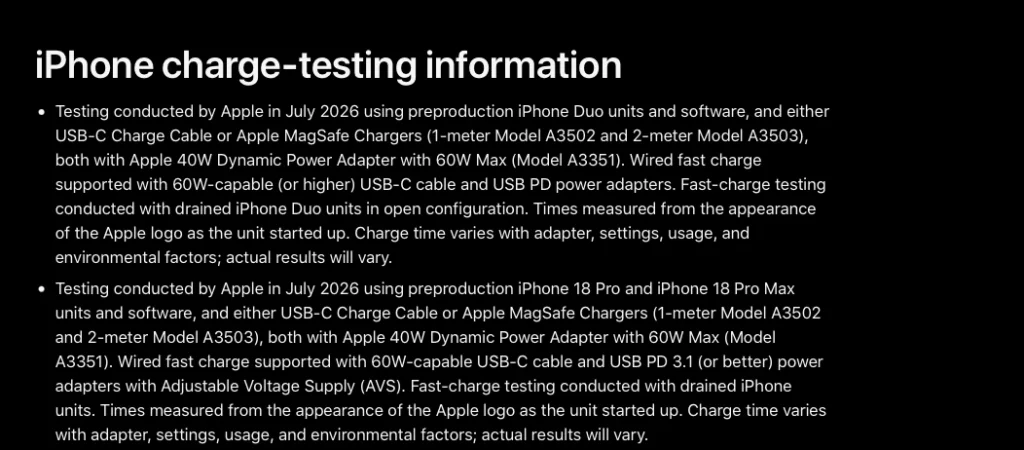
Apple advertises the following results for the iPhone 18 Pro Max:
- Wired: Up to 50% battery in approximately 15 minutes with the recommended fast-charging setup.
- MagSafe: Up to 50% battery in approximately 30 minutes with the specified charger and adapter.
These measurements were obtained under controlled conditions.
Your charging time may differ because of battery temperature, starting charge level, adapter capability, background activity, and other factors.
Does the iPhone 18 Pro Max charge fully in 30 minutes?
No. Apple’s claim refers to approximately 50%, not 100%.
Charging normally becomes slower as the battery fills, particularly at higher charge levels.
This helps manage battery conditions and charging stress.
It would be inaccurate to double Apple’s 15-minute claim and assume the phone always reaches 100% in 30 minutes.
Apple does not guarantee a universal zero-to-100% time for every charging setup.
How to Get the Fastest Wired Charging Speed
To use the iPhone 18 Pro Max’s supported wired fast-charging capability:
- Choose Apple’s 40W Dynamic Power Adapter with 60W Max or another compatible 60W-capable AVS adapter.
- Use a USB-C charging cable rated for at least 60W.
- Connect the cable directly to the power adapter.
- Plug the adapter into a working wall outlet.
- Connect the USB-C cable to your iPhone 18 Pro Max.
- Allow the phone to charge without running demanding applications if you’re trying to compare charging performance.
- Check the charging information in Settings > Battery.
For the most consistent results, avoid testing while the device is unusually hot, performing major background tasks, or running intensive games.
Can you use a USB-C hub?
Some hubs and multiport adapters support charging, but their power-delivery behavior can vary.
A hub may reserve power for other connected devices or restrict the wattage delivered to the iPhone.
If you want to reproduce Apple’s advertised fast-charging performance, connect the iPhone directly to a suitable power adapter.
Does a 100W or 140W charger damage the iPhone?
A properly designed, compatible USB-C Power Delivery adapter negotiates power with the connected device.
The iPhone does not automatically receive the charger’s full rated maximum output simply because the adapter is capable of supplying it.
However, you should still choose reputable, standards-compliant equipment and check compatibility.
Higher wattage alone is not a reason to expect faster charging beyond what the phone supports.
Does iPhone 18 Pro Max Support MagSafe Charging?
Yes.
The iPhone 18 Pro Max supports MagSafe wireless charging at up to 25W.
Apple also lists Qi2 wireless charging at up to 25W with compatible equipment.
The supported rate depends on the charger, adapter, and charging conditions.
What adapter do you need for fast MagSafe charging?
For Apple’s advertised wireless result of up to 50% in approximately 30 minutes, use:
- A compatible Apple MagSafe Charger.
- A 35W or higher USB-C power adapter.
- An appropriate power outlet.
- Correct magnetic alignment between the phone and charging puck.
Place the phone on the MagSafe charger and confirm that charging has started.
Is every magnetic wireless charger a 25W charger?
No.
Some accessories use magnetic alignment without supporting the maximum MagSafe or Qi2 charging rate available on the phone.
A charger may attach magnetically and still provide a lower wattage.
Check the accessory’s own specifications and compatibility claims.
Does wireless charging generate heat?
Wireless charging can produce heat during operation.
Apple may reduce charging performance if the iPhone becomes too warm.
If the phone repeatedly becomes unusually hot, check the charger, case, alignment, and surrounding temperature.
You can also read our iPhone Overheating After iOS 27.2.1 guide for related troubleshooting.
MagSafe vs USB-C: Which Charging Method Is Better?
Both are useful, but they serve slightly different purposes.
| Factor | USB-C wired | MagSafe wireless |
|---|---|---|
| Fastest advertised 50% time | Around 15 minutes | Around 30 minutes |
| Cable connection to iPhone | Yes | No, magnetic attachment |
| Main advantage | Maximum advertised charging speed | Convenience |
| Adapter for Apple’s fastest claim | 60W-capable with AVS | 35W or higher |
| Extra charging accessory | USB-C cable | Compatible MagSafe puck |
Our recommendation: Use USB-C when charging speed matters most. Choose MagSafe when convenience is more important than reaching the fastest possible wired charging rate.
Neither method is inherently the best choice for everyone.
Does iPhone 18 Pro Max Support Qi2 Charging?
Yes.
Apple lists Qi2 wireless charging support up to 25W.
However, not all Qi2 chargers have identical output specifications.
A charger must support the relevant power level and operate under suitable conditions to approach the phone’s supported maximum.
Before choosing a Qi2 pad or stand, check:
- Its supported Qi2 charging wattage.
- Compatibility with iPhone 18 Pro Max.
- Power-adapter requirements.
- Whether the adapter is included.
- Applicable safety and certification information.
Avoid assuming that every Qi2-labeled charger automatically provides 25W.
Can You Use Your Old iPhone Charger?
In many cases, yes.
Older USB-C adapters can often charge newer iPhones, even if they don’t provide the latest model’s maximum speed.
Here are some common examples.
Older 20W Apple adapter
Compatible for charging, but not the fastest advertised mode.
Existing 30W USB-C adapter
Can provide power if compatible, but does not satisfy the newest 60W AVS fast-charging requirement.
MacBook USB-C charger
Many MacBook USB-C adapters can also charge iPhones.
However, actual fast-charging behavior depends on the adapter’s supported output modes, including AVS.
For example, an adapter suitable for a MacBook may provide more than enough nominal wattage but still lack the particular AVS support needed for Apple’s fastest iPhone 18 Pro Max charging claim.
Older MagSafe charger
It may still charge a compatible iPhone, but the available power level can be lower than the newest 25W capability.
The important distinction is that a charger can be compatible without supporting the fastest available charging speed.
Why Is My iPhone 18 Pro Max Charging Slowly?
If the phone charges more slowly than expected, the charger isn’t necessarily defective.
Several conditions can limit speed.
1. The adapter doesn’t support AVS
A charger can advertise 65W or even 100W without providing the required AVS capability.
Check the technical specification sheet.
2. The cable isn’t suitable
Use a USB-C cable rated for the required power level.
Apple includes a compatible charging cable with the phone.
3. The iPhone is too warm or too cold
iOS can temporarily slow or pause charging to protect the battery.
Move the phone to a suitable environment and allow its temperature to normalize.
4. You’re using a low-power source
Computer USB ports, hubs, or some multi-device chargers may supply less power than a suitable dedicated adapter.
5. Charging slows at a higher battery percentage
Fast-charging claims typically describe the early part of charging.
The rate naturally changes as the battery fills.
6. iOS reports a slow charger
On supported versions of iOS, Apple provides charging information in Settings > Battery.
A Slow Charger indication can help identify a charging setup that isn’t delivering optimal power.
If the iPhone isn’t charging at all, that’s a separate problem. Follow our iPhone Not Charging: 12 Fixes guide rather than replacing the adapter based only on its wattage rating.
Will iPhone 18 Pro Max Stop Charging at 80%, 85%, or 90%?
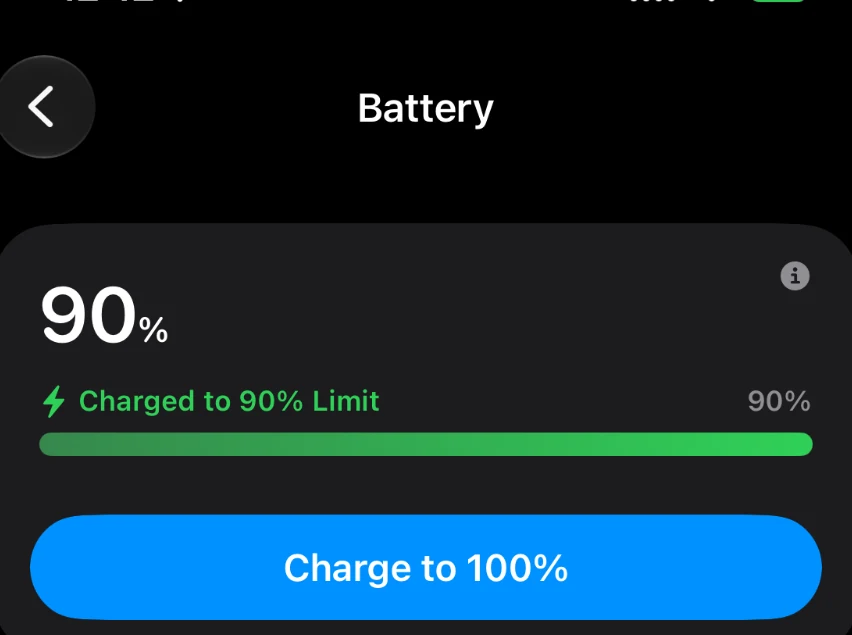
It can, depending on your settings.
Apple lets users configure a Charge Limit on compatible iPhones.
This helps reduce the amount of time the battery spends at a high state of charge.
How to check your charging limit
- Open Settings.
- Tap Battery.
- Select Charging.
- Review the configured Charge Limit.
- Adjust it if your charging needs have changed.
For example, a phone configured to stop near 90% is not necessarily experiencing a fault.
Apple also provides Optimized Battery Charging behavior under supported configurations.
A charging limit and a slow charger are different issues.
Don’t purchase a more expensive adapter expecting it to override your chosen battery limit.
For more information, see Apple’s Charge Limit guidance.
Is It Safe to Charge iPhone 18 Pro Max Overnight?
Apple designs iPhone charging systems to manage battery charging automatically.
Overnight charging with suitable equipment is generally supported.
However, charging habits and heat can affect long-term battery health.
For a safer setup:
- Use a compatible, undamaged charger and cable.
- Avoid covering the phone or adapter with bedding.
- Keep the phone in a reasonably ventilated location.
- Review the Charge Limit and Optimized Battery Charging settings.
- Avoid charging in environments outside Apple’s recommended temperature range.
Apple warns that sustained exposure to excessive heat can reduce battery lifespan.
If you frequently leave your phone connected to power for long periods, a suitable charge limit may be worth considering.
iPhone 18 Pro Max vs 17 Pro Max Charging: What’s Changed?
Apple advertises faster wired charging for the iPhone 18 Pro Max than the previous generation.
| Specification | iPhone 17 Pro Max | iPhone 18 Pro Max |
|---|---|---|
| Fastest advertised wired 50% time | About 20 minutes | About 15 minutes |
| Fastest-mode adapter | Compatible 40W-class setup | 60W-capable AVS setup |
| USB-C charging | Yes | Yes |
| MagSafe charging | Yes | Yes |
The newer iPhone improves the advertised time by approximately five minutes under Apple’s corresponding fast-charge test conditions.
However, that doesn’t mean every existing charger will produce the same improvement.
The power adapter and cable matter.
If you’re deciding whether to upgrade phones, charging speed is only one part of the comparison.
The larger differences between the generations also involve camera controls, processing hardware and battery endurance.
Frequently Asked Questions
What charger does iPhone 18 Pro Max use?
The iPhone 18 Pro Max uses USB-C for wired charging and supports MagSafe and Qi2 wireless charging. For Apple’s fastest advertised wired speed, use a 60W-capable USB-C adapter with AVS and an appropriate cable.
Does iPhone 18 Pro Max come with a charging brick?
No. Apple includes a 1-meter USB-C charging cable but does not include a wall power adapter.
Does iPhone 18 Pro Max need a 60W charger?
Not for ordinary charging. A compatible lower-wattage USB-C adapter can charge the phone. The 60W-capable AVS requirement applies to Apple’s fastest advertised wired-charging performance.
Can I use a 20W Apple charger with iPhone 18 Pro Max?
Yes. A compatible 20W USB-C charger can supply power, although it cannot reproduce the fastest 15-minute charging claim.
Is a 65W charger enough for iPhone 18 Pro Max?
It may be, but the adapter must support the appropriate USB Power Delivery and AVS requirements. A 65W label alone is not sufficient proof.
Does iPhone 18 Pro Max support MagSafe?
Yes. Apple’s specifications list MagSafe wireless charging up to 25W with compatible charging equipment.
How fast can MagSafe charge iPhone 18 Pro Max?
Apple advertises up to 50% in around 30 minutes using a compatible MagSafe Charger and a 35W or higher adapter under its test conditions.
Can I use a MacBook charger with iPhone 18 Pro Max?
A compatible USB-C MacBook power adapter can charge the iPhone. Reaching the fastest advertised speed also depends on its AVS capability and the charging cable.
Will a 100W charger damage iPhone 18 Pro Max?
A properly designed, compatible USB-C Power Delivery charger negotiates power with the phone. Higher rated wattage doesn’t automatically mean the phone receives that entire amount. Avoid damaged or unsafe equipment.
Why is my iPhone 18 Pro Max charging slowly?
Possible reasons include a lower-power adapter, lack of AVS support, an unsuitable cable, excessive heat, background activity, or normal charging slowdown near a full battery.
Does iPhone 18 Pro Max support Qi2?
Yes. Apple specifies Qi2 wireless charging support up to 25W, although actual speed depends on the compatible charger and power source.
Why won’t my iPhone charge past 90%?
Check Settings > Battery > Charging. You may have configured a 90% Charge Limit. Temperature protections or charging optimization can also affect charging.
Final Verdict: Which Charger Should You Use?
The best iPhone 18 Pro Max charger depends on whether your priority is speed, convenience, or reusing accessories you already own.
For the fastest advertised wired charging, choose a 60W-capable USB-C adapter with AVS and a suitable USB-C cable.
For convenient wireless charging, use a compatible MagSafe charger with an appropriate power adapter.
If you already own a safe, compatible USB-C charger and don’t need maximum speed, you may not need to buy anything.
The most important mistake to avoid is choosing an adapter based only on its advertised wattage. USB Power Delivery compatibility, AVS support, cable capability, and charging conditions all matter.
The Synced Desk Editorial Methodology
This guide is based on Apple’s official iPhone 18 Pro Max technical specifications, fast-charging documentation, and iOS charging guidance.
The Synced Desk has not independently tested the charging speed of multiple iPhone 18 Pro Max adapters or certified specific third-party chargers. Apple’s published charge times are identified as manufacturer test results, not firsthand measurements.
Last fact-checked: November 19, 2026.
Official Sources
- Apple Support: Fast Charge Your iPhone
- Apple: iPhone 18 Pro and Pro Max Technical Specifications
- Apple Support: Power Adapters for iPhone
- Apple: 40W Dynamic Power Adapter With 60W Max
- Apple Support: About iPhone Charging Speeds
- Apple Support: Set a Charge Limit on iPhone
- Apple Support: Understand Thermally Limited Charging