Quick Answer: What Is Clean Energy Charging on iPhone?
Clean Energy Charging on iPhone is an Apple feature that uses electricity-grid forecasts to charge your phone when lower-carbon electricity is expected to be available. It works automatically in supported US locations and may temporarily delay charging when it predicts your iPhone will still finish charging before you need it.
To find the setting on an iPhone 15 or later, open Settings > Battery > Charging > Clean Energy Charging. On iPhone 14 and earlier, go to Settings > Battery > Battery Health & Charging.
The feature is available only in the United States. If your iPhone is charging normally, you usually don’t need to change anything.
If charging is temporarily paused because of Clean Energy Charging, you can open Settings > Battery and tap Resume Charging when the option appears.
This guide explains how Clean Energy Charging works, how to turn it on or off, why it may delay charging, and how it differs from Optimized Battery Charging and Charge Limit.
Table of Contents
What Is Clean Energy Charging on iPhone?
Apple introduced Clean Energy Charging with iOS 16.1 to help reduce the carbon emissions associated with charging an iPhone.
The feature looks at forecasts of the carbon emissions associated with electricity supplied by the local power grid.
Electricity generation varies throughout the day. At some times, a greater share of the grid’s electricity comes from lower-carbon sources.
When the feature is active, your iPhone may adjust its charging schedule to take advantage of those periods.
Does Clean Energy Charging mean your iPhone uses only renewable electricity?
No.
Your iPhone remains connected to the same electricity supply through its charger.
It doesn’t physically choose whether electricity comes from a solar panel, wind turbine, or power plant.
Instead, it uses information about expected grid emissions to determine when charging may have a lower carbon impact.
In simple terms: Clean Energy Charging changes when some charging happens, not the type of electricity your charging cable directly receives.
Is Clean Energy Charging turned on automatically?
Yes, in the United States.
Apple states that the feature is enabled by default when you set up a compatible iPhone in a supported US location.
However, this doesn’t mean it will delay every charging session.
The feature depends on charging habits, location information, and the availability of a suitable electricity-grid forecast.
How Does Clean Energy Charging Work?
Clean Energy Charging combines two main types of information.
Electricity-grid forecasts: Predictions of when electricity production is expected to have lower carbon emissions.
Your charging routine: The approximate times and places where you regularly charge your iPhone.
For example, imagine you normally connect your iPhone to a charger at 10 PM and unplug it at 7 AM.
If the electricity-grid forecast predicts cleaner energy will be available later during that period, iOS may temporarily delay some charging.
The system attempts to finish charging before you normally need your iPhone.
Does Clean Energy Charging stop your phone from charging?
It can temporarily delay charging under suitable conditions.
However, it isn’t designed to leave your iPhone uncharged when it correctly predicts your usual unplugging time.
Apple says Clean Energy Charging operates when the device can complete charging before you are expected to need it.
If a suitable carbon-emissions forecast is unavailable, the iPhone normally charges without activating this feature.
Does it work whenever you plug in your iPhone?
No.
Apple explains that Clean Energy Charging is intended for places where you regularly charge your iPhone for extended periods.
Typical examples include your home or workplace.
It may not activate at an unfamiliar location or when your charging schedule varies significantly.
This helps avoid unnecessary charging delays when iOS cannot reliably predict when you’ll disconnect the charger.
How to Turn On Clean Energy Charging on iPhone
The correct path depends on your iPhone model.
The following instructions reflect Apple’s iOS 27 guidance.
For iPhone 15, 16, 17, and 18 Models
- Open the Settings app.
- Tap Battery.
- Select Charging.
- Find Clean Energy Charging.
- Turn the setting on if it is available.
This includes supported newer models such as the iPhone 17 Pro.
However, the feature is available only in the United States.
If your iPhone is configured or used outside the supported region, you may not see the option.
For iPhone 14 and Earlier Models
On compatible older iPhones:
- Open Settings.
- Tap Battery.
- Select Battery Health & Charging.
- Find Clean Energy Charging.
- Enable the setting.
Apple introduced this feature with iOS 16.1, so an earlier unsupported iOS version will not provide it.
What if you can’t find Clean Energy Charging?
First, confirm that the feature is available in your region.
If you’re outside the United States, the option may not appear.
If you’re in the US with a compatible iPhone, also check your software version and the correct Battery settings screen.
Don’t install third-party configuration profiles or unknown apps that promise to unlock the feature.
How to Turn Off Clean Energy Charging on iPhone
You may prefer to turn off Clean Energy Charging if you need a more predictable charging schedule.
Apple allows you to control the feature directly.
Turn Off Clean Energy Charging on iPhone 15 or Later
- Open Settings.
- Tap Battery.
- Select Charging.
- Find Clean Energy Charging.
- Turn the switch off.
- Choose the appropriate confirmation option if prompted.
Your iPhone will no longer intentionally delay charging because of this feature while it remains disabled.
However, other charging protections and settings can still affect charging behavior.
Turn Off Clean Energy Charging on iPhone 14 or Earlier
- Open Settings.
- Select Battery.
- Tap Battery Health & Charging.
- Turn off Clean Energy Charging.
Some software versions may offer a temporary or longer-lasting disable option.
Read the options presented on your actual device.
Will disabling Clean Energy Charging make your iPhone charge faster?
Not necessarily.
Disabling the feature can prevent delays caused specifically by its clean-energy scheduling.
It does not increase the maximum wattage supported by your iPhone or charging adapter.
If your iPhone charges slowly because of an underpowered adapter, temperature protection, or a damaged cable, disabling Clean Energy Charging will not resolve that underlying issue.
For general charging problems, read our iPhone Not Charging: 12 Fixes to Try guide.
How to Resume Charging Without Disabling Clean Energy Charging
You don’t always need to turn off Clean Energy Charging permanently.
Apple provides a temporary override when the feature has paused charging.
Steps for iOS 27
- Connect your iPhone to its charger.
- If charging is paused, open Settings.
- Tap Battery.
- Look for the charging information.
- Tap Resume Charging, if available.
This tells the iPhone to resume charging rather than waiting for the scheduled cleaner-energy period.
Can you use Charge Now?
Apple also documents a Charge Now option that can appear with a Clean Energy Charging notification on supported versions of iOS.
The exact wording and placement depend on your software and the charging information displayed.
Follow the option shown by your actual iPhone.
What if Resume Charging is missing?
The option is only relevant when charging is currently being delayed in a way that allows a manual resume.
If Clean Energy Charging isn’t active, your iPhone may have no such button.
A missing Resume Charging option does not automatically mean something is broken.
Clean Energy Charging vs. Optimized Battery Charging
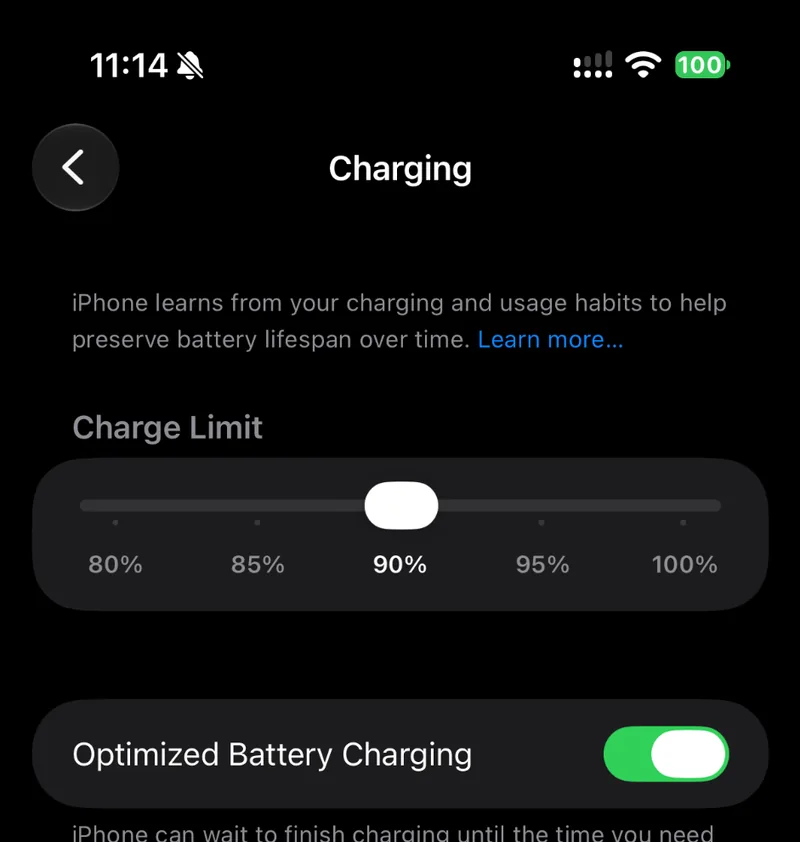
These are two different Apple features.
Although they can work together, their primary purposes aren’t the same.
Clean Energy Charging
Main purpose: Reduce the carbon impact associated with charging.
It uses electricity-grid forecasts and charging routines.
The feature may delay charging when lower-carbon electricity is expected.
Optimized Battery Charging
Main purpose: Reduce battery aging associated with keeping an iPhone fully charged for extended periods.
It learns your normal charging schedule.
When appropriate, it can delay charging past approximately 80% until closer to the time you typically need your phone.
Charge Limit
Main purpose: Control the maximum charging percentage on supported iPhones.
For example, you can set a supported iPhone to stop charging near a selected limit instead of routinely charging all the way to 100%.
Charge Limit is different from both Clean Energy Charging and Optimized Battery Charging.
| Feature | Primary purpose | What it may do |
|---|---|---|
| Clean Energy Charging | Lower charging-related carbon emissions | Delay charging based on grid forecasts |
| Optimized Battery Charging | Reduce battery aging | Delay charging beyond 80% based on your routine |
| Charge Limit | Manage maximum charge level | Stop charging near a selected percentage |
Can these settings affect charging at the same time?
Some charging-management features can interact, depending on your model and configuration.
However, they should not be treated as identical.
If your iPhone stops charging at exactly the limit you’ve selected, Clean Energy Charging may not be the reason.
Likewise, a temperature-related charging pause is not automatically a clean-energy delay.
Why Is My iPhone Charging on Hold?
An iPhone can temporarily pause charging for several reasons.
Clean Energy Charging is only one possibility.
1. Clean Energy Charging is active
On supported US devices, iOS may display charging information indicating a scheduled pause.
When this happens, the Battery screen may provide a Resume Charging option.
2. Optimized Battery Charging is active
Your iPhone may wait before completing the final portion of a charge because it predicts you’ll remain connected to power for an extended period.
3. Your Charge Limit has been reached
If you’ve configured a charge limit below 100%, the phone may intentionally stop charging near that percentage.
For instance, a selected 90% limit is not a charging malfunction.
4. The iPhone is too warm or cold
iOS can restrict charging to help protect the battery when the device’s temperature is outside an appropriate range.
Move it to a suitable environment and allow the temperature to normalize.
Do not use extreme cooling or heating methods.
5. The charging cable or adapter has a problem
A damaged cable, faulty adapter, or poor connection can cause charging difficulties.
These issues should be diagnosed separately.
Important: Don’t disable Clean Energy Charging to solve a charging problem unless you have a reason to believe that the feature is causing the delay.
Why Is Clean Energy Charging Not Showing on My iPhone?
Several explanations are possible.
You’re outside the United States
This is the most important reason.
Apple currently identifies Clean Energy Charging as a US-only feature.
If you’re using your iPhone in Bangladesh, India, the United Kingdom, or another unsupported location, you shouldn’t assume the setting will be available.
Your iPhone is running an older iOS version
Clean Energy Charging was introduced with iOS 16.1.
If your device runs an earlier version, the feature will not be available.
You’re checking the wrong Battery menu
The location of the setting differs between device generations.
On iPhone 15 and later, use Settings > Battery > Charging.
On iPhone 14 and earlier, use Settings > Battery > Battery Health & Charging.
Your location settings are restricting the feature
Apple says certain location settings are required for Clean Energy Charging to operate as intended.
However, a disabled location setting doesn’t necessarily explain why the Clean Energy Charging switch itself is missing.
Check regional availability first.
Does changing your iPhone’s region enable it?
Changing a region label or using a VPN does not guarantee that Clean Energy Charging becomes available or functional.
The feature depends on supported electricity-grid forecasts and location-based charging information.
It is not merely an interface setting that works everywhere.
Location Settings Required for Clean Energy Charging
Apple documents several location settings associated with the feature.
If you’re in a supported US location and Clean Energy Charging is enabled but not operating as expected, review them.
Step 1: Turn On Location Services
Open:
Settings > Privacy & Security > Location Services
Make sure Location Services is enabled if you want to use the feature.
Step 2: Check System Customization
Within Location Services:
- Open System Services.
- Find System Customization.
- Make sure it is enabled.
Step 3: Check Significant Locations & Routes
Apple also identifies Significant Locations & Routes as relevant to Clean Energy Charging.
Review that setting under System Services.
The exact label may vary slightly depending on your iOS version and regional configuration.
Does Apple receive your charging location?
Apple’s Clean Energy Charging support documentation states that your iPhone does not send the location information used for this feature to Apple.
That doesn’t mean every related internet service is entirely offline.
Rather, the location information used for learning where you regularly charge is handled according to Apple’s stated privacy design.
You should still review your general location privacy preferences and decide which optional features you want enabled.
Does Clean Energy Charging Improve Battery Health?
Clean Energy Charging is primarily an environmental feature.
Its purpose is to shift some charging to periods when electricity is expected to have lower carbon emissions.
It should not be presented as a direct replacement for battery-health features.
If you want to manage long-term battery aging, focus on Apple’s battery recommendations, including:
- Avoiding excessive heat
- Using appropriate chargers
- Understanding Optimized Battery Charging
- Setting a suitable Charge Limit where supported
- Keeping your iPhone updated
Disabling Clean Energy Charging does not automatically damage your battery.
Similarly, enabling it does not guarantee longer battery lifespan.
Does Clean Energy Charging Save Electricity or Money?
Clean Energy Charging changes the timing of some charging activity.
It does not reduce your iPhone’s battery capacity or eliminate the electricity required to recharge it.
Does it reduce carbon emissions?
That is the feature’s intended purpose.
By shifting charging to times when local grid electricity is forecast to have lower carbon emissions, Apple aims to reduce the environmental impact of charging.
However, the impact of an individual charging session depends on real grid conditions and whether the feature activates.
Does it lower your electricity bill?
Not necessarily.
The feature is based on carbon-emissions forecasts rather than your utility company’s electricity prices.
If your electricity plan has different prices at different times, your actual cost depends on that tariff.
Do not assume that a cleaner-energy charging window always coincides with the cheapest electricity.
Does it work with solar power at home?
The feature does not automatically identify and prioritize the output of your individual rooftop solar panels.
Apple describes the feature in terms of forecasts for the local electricity grid.
If your home uses solar power or battery storage, actual household energy flows may differ from the general grid forecast.
Should You Keep Clean Energy Charging Turned On?
For most eligible US users who charge their iPhones on a predictable schedule, leaving it enabled is a reasonable default.
Apple designed the feature to operate without requiring users to manually schedule every charge.
Reasons to leave it enabled
- You want to use Apple’s lower-carbon charging feature.
- You charge regularly at home or work.
- Your charging schedule is fairly predictable.
- You don’t mind an occasional planned charging delay.
Reasons you might turn it off temporarily
- You need to charge immediately before leaving.
- Your charging routine is unusually unpredictable.
- You prefer not to use the scheduling feature.
- You want to test whether a documented Clean Energy Charging pause is affecting your current charging session.
When you only need a faster return to normal charging during one session, Resume Charging may be more convenient than changing the setting permanently.
Frequently Asked Questions
What does Clean Energy Charging mean on iPhone?
It means your iPhone can use local electricity-grid carbon-emissions forecasts to schedule charging during periods when cleaner electricity is expected to be available.
Is Clean Energy Charging enabled by default?
Yes. Apple says it is enabled by default for supported iPhones set up in the United States.
How do I turn off Clean Energy Charging on iPhone 17 Pro?
Open Settings > Battery > Charging, locate Clean Energy Charging, and turn it off if the option is available.
Can Clean Energy Charging slow down iPhone charging?
It can intentionally delay the timing of charging under suitable conditions. That is different from reducing the charger’s maximum charging speed.
How do I override Clean Energy Charging?
When the feature pauses charging, open Settings > Battery and tap Resume Charging if the option appears.
Why is Clean Energy Charging missing from my iPhone?
The feature is available only in the United States. An unsupported region, older iOS version, or checking the wrong settings menu can explain why it isn’t visible.
Does Clean Energy Charging work outside the US?
Apple currently describes Clean Energy Charging as available only in the United States. Do not assume changing your region or using a VPN makes it work elsewhere.
Does Clean Energy Charging damage the battery?
It is not designed to damage the battery. It schedules some charging based on grid forecasts. Battery-health management is handled by separate features such as Optimized Battery Charging and Charge Limit.
What is the difference between Clean Energy Charging and Optimized Battery Charging?
Clean Energy Charging focuses on lower-carbon electricity use. Optimized Battery Charging focuses on reducing battery aging by managing how long the battery remains fully charged.
Can I leave Clean Energy Charging on overnight?
Yes. Overnight charging at a regular location is one of the situations where it may learn your routine and schedule charging appropriately.
Does Clean Energy Charging save money?
Not necessarily. Apple bases the feature on estimated electricity-grid emissions, not on the prices charged by your electricity provider.
Is Clean Energy Charging the same as Low Power Mode?
No. Low Power Mode reduces certain iPhone activities to conserve battery power. Clean Energy Charging changes the timing of some charging sessions to use electricity during lower-carbon periods.
Final Thoughts
Clean Energy Charging on iPhone is a useful feature for eligible US users who want to reduce the carbon impact associated with charging.
It relies on local electricity-grid forecasts and your regular charging habits to determine when delaying some charging may be beneficial.
You can control the feature through Battery settings, and iOS provides a way to resume charging during a temporary Clean Energy Charging pause.
Remember that it is different from Optimized Battery Charging, Charge Limit, and temperature-related charging protection.
If the feature isn’t available outside the United States, that is an expected regional limitation rather than necessarily a fault with your iPhone.
For most eligible users, leaving it enabled is a practical choice. If you occasionally need immediate charging, use the available temporary override instead of assuming the feature must be permanently disabled.
Official References
- Apple iPhone User Guide: Charge with cleaner energy sources
- Apple Support: Use Clean Energy Charging on your iPhone
- Apple Support: About Charge Limit and Optimized Battery Charging
- Apple Support: If your iPhone won’t charge
Last reviewed: November 21, 2026. This guide is based on Apple’s iOS 27 documentation and official support guidance. Feature availability and the exact controls depend on your iPhone model, iOS version, and location.