Why is my iPhone battery icon yellow? If you suddenly notice a yellow battery symbol in the upper-right corner of your iPhone, you might wonder whether your battery is damaged, running low, or experiencing a charging problem.
Fortunately, the explanation is usually simple.
A yellow battery icon means Low Power Mode is turned on. It’s an Apple feature that reduces certain background activities and power-consuming functions to help your iPhone’s battery last longer.
The yellow color itself doesn’t indicate a hardware failure or a battery that needs replacing.
You might have enabled Low Power Mode manually, selected it after receiving a low-battery alert, or allowed a supported battery-saving feature to activate it automatically.
In this guide, we’ll explain what the yellow battery icon means, how to turn it off, why it sometimes appears automatically, and whether Low Power Mode affects your iPhone’s performance or battery health.
These instructions apply to recent iPhones, including the iPhone 17 Pro running iOS 27.
Quick Answer: Why Is My iPhone Battery Icon Yellow?
Your iPhone battery icon is yellow because Low Power Mode is enabled.
To turn it off on an iPhone 15 or later:
- Open Settings.
- Tap Battery.
- Select Power Mode.
- Find Low Power Mode.
- Turn off the switch.
On iPhone 14 and earlier, the Low Power Mode switch is generally located directly under Settings → Battery.
Once Low Power Mode is disabled, the battery indicator should return to its normal appearance according to the current battery and charging state.
Important: You don’t need to restart your iPhone, reset its settings, or replace its battery just because the icon is yellow.
Apple explains these controls in its official Low Power Mode guide.
What Does a Yellow Battery Icon Mean on iPhone?
The iPhone status bar contains symbols that communicate information about the device.
One of these is the battery indicator.
Normally, it reflects your remaining battery charge and charging status.
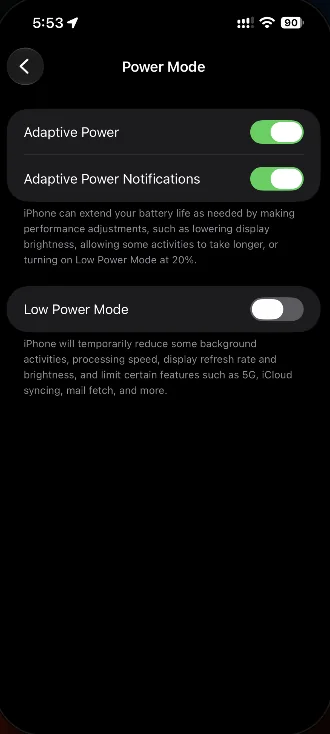
However, when Low Power Mode is active, the battery symbol becomes yellow.
This helps you recognize that your iPhone is operating in its power-saving mode.
Does Yellow Mean the Battery Is Damaged?
No.
A yellow battery icon alone isn’t evidence of physical battery damage.
Low Power Mode is a normal software feature designed by Apple.
It can be enabled even when the battery is healthy.
If your iPhone’s battery condition is deteriorating, you should investigate its Battery Health information separately.
Does Yellow Mean the iPhone Is Almost Dead?
Not necessarily.
Low Power Mode can be activated manually at different battery percentages.
For example, you can turn it on before leaving home with a relatively full battery if you expect to spend a long day away from a charger.
That means a yellow battery icon doesn’t automatically indicate that the charge is below 20%.
The most reliable way to find out how much charge remains is to check the actual battery percentage.
Why Is My iPhone Battery Icon Yellow? 5 Essential Facts
Here are the five most important things to understand about Apple’s yellow battery indicator.
1. Yellow Means Low Power Mode Is On
This is the direct explanation.
Low Power Mode reduces certain activities to conserve battery power.
The yellow status-bar icon is Apple’s visual indicator that the feature is currently enabled.
2. You Can Enable It at Higher Battery Percentages
Low Power Mode isn’t restricted to an almost-empty battery.
You can enable it manually when you want to conserve power.
For example, you might use it during travel or while working in an area where charging isn’t convenient.
3. Some iPhone Features May Behave Differently
Low Power Mode can reduce display brightness, background app activity, certain downloads, and visual effects.
This doesn’t mean those features are permanently disabled.
Normal behavior generally resumes after you turn Low Power Mode off.
4. Low Power Mode Turns Off Automatically After Charging
Apple states that Low Power Mode automatically turns off when the iPhone charges to 80% or higher.
However, you can manually activate it again if you want to conserve power.
5. Newer iPhones Can Activate It Automatically
On supported iPhones, Adaptive Power can enable Low Power Mode when the battery reaches 20%.
The iPhone 17 Pro supports Adaptive Power, making this especially relevant for newer-device owners.
We’ll explain the difference between Adaptive Power and Low Power Mode below.
How to Turn Off the Yellow Battery Icon on iPhone
If you don’t want the yellow battery icon, simply disable Low Power Mode.
The menu location depends on your iPhone model.
Method 1: Turn Off Low Power Mode in Settings
On iPhone 15 and later, including the iPhone 17 Pro:
- Open Settings.
- Select Battery.
- Tap Power Mode.
- Find Low Power Mode.
- Turn off the switch.
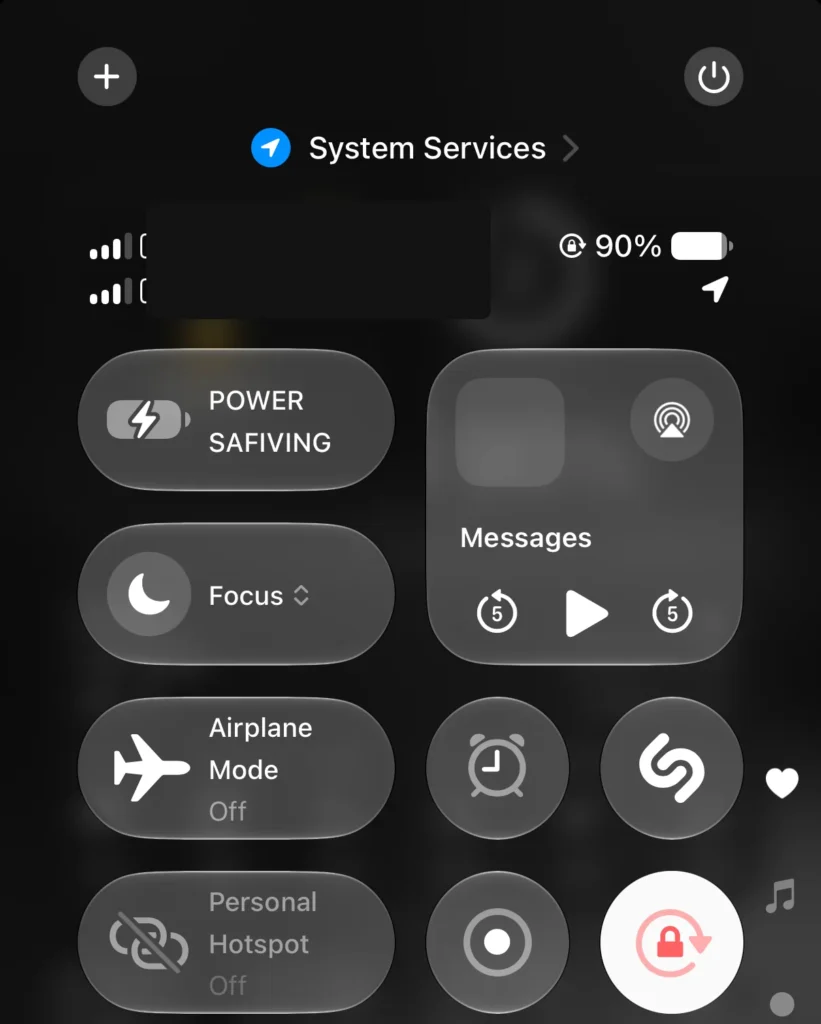
The yellow battery indicator should change to its normal appearance.
You don’t need to wait for the phone to reach a specific battery percentage.
What About iPhone 14 and Earlier?
On compatible older models, use:
Settings → Battery → Low Power Mode
Turn off the switch.
Apple documents this menu difference between iPhone 15-and-later models and earlier iPhones.
Method 2: Turn Off Low Power Mode Using Control Center
Control Center provides another convenient way to manage Low Power Mode.
On a Face ID iPhone:
- Swipe down from the top-right corner.
- Find the Low Power Mode control, if it has been added.
- Tap the control to turn the feature off.
If the control isn’t present, you can add it using Control Center customization.
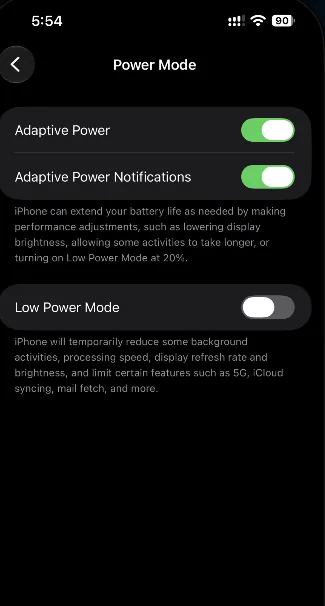
Once the control is available, you can enable or disable Low Power Mode without opening the full Settings app.
Method 3: Ask Siri
Apple also supports managing Low Power Mode through Siri.
Try saying:
“Hey Siri, turn off Low Power Mode.”
Or activate Siri using your usual method and ask it to disable Low Power Mode.
Your iPhone should change the setting if Siri processes the request successfully.
For the simplest manual method, use Settings → Battery → Power Mode.
Why Does My iPhone Battery Icon Turn Yellow Automatically?
If you didn’t manually enable Low Power Mode, your iPhone may have activated it through a supported power-saving feature.
Low Battery Alerts
iPhone can suggest enabling Low Power Mode when the battery becomes low.
If you accept the prompt, the battery icon turns yellow.
This is normal behavior.
A low-battery alert doesn’t mean the device is damaged.
Adaptive Power on iPhone 17 Pro
Apple introduced Adaptive Power for supported newer iPhones.
Adaptive Power evaluates recent battery usage patterns and makes certain adjustments intended to extend battery life.
It can reduce background activity, make small brightness adjustments, and enable Low Power Mode when the battery reaches 20%.
Adaptive Power is enabled by default on iPhone 17 Pro models, according to Apple.
How to Check Adaptive Power
- Open Settings.
- Tap Battery.
- Select Power Mode.
- Find Adaptive Power.
- Review whether it is enabled.
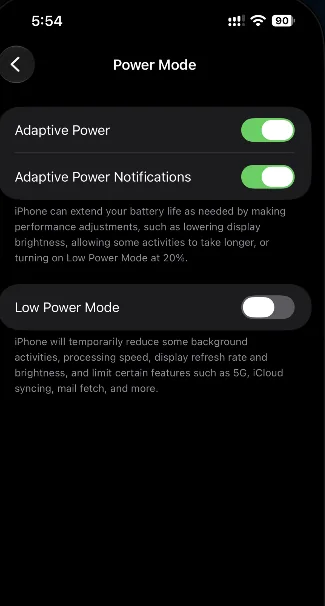
You can enable or disable the feature according to your preferences.
However, Adaptive Power and Low Power Mode are separate controls.
Can Adaptive Power Cause the Yellow Battery Icon?
Yes, indirectly.
Adaptive Power can turn on Low Power Mode at low battery levels on supported devices.
When Low Power Mode activates, the battery symbol becomes yellow.
Adaptive Power operating on its own doesn’t mean the battery icon must constantly remain yellow.
For more details, read Apple’s Adaptive Power documentation.
What Happens When You Turn On Low Power Mode?
Low Power Mode reduces the amount of power your iPhone uses by limiting some features and background activities.
The exact effects can depend on the iPhone model, iOS version, and application.
1. Background App Refresh Is Reduced
Background App Refresh normally allows supported applications to retrieve or prepare information while you’re not actively using them.
Low Power Mode disables ordinary Background App Refresh.
This may delay updates from some applications.
However, turning on Low Power Mode doesn’t guarantee that every form of background processing or every notification stops.
2. Mail Fetch May Be Paused
Low Power Mode disables automatic email fetching.
This can delay updates for mail accounts that rely on fetching messages.
Email delivery behavior also depends on the provider and the account’s configuration.
If an email account isn’t updating as expected, check whether Low Power Mode is active before deleting or reconfiguring the account.
3. Display Brightness May Decrease
Apple reduces display brightness in Low Power Mode to conserve energy.
If your iPhone suddenly appears dimmer, the battery-saving mode may be contributing.
However, brightness can also change because of Auto-Brightness, device temperature, and other display settings.
If the screen continues dimming unexpectedly even after turning Low Power Mode off, see our iPhone Screen Keeps Dimming troubleshooting guide.
4. ProMotion Refresh Rate Is Limited
On supported ProMotion iPhones, Low Power Mode limits the display refresh rate to 60 frames per second.
The iPhone 17 Pro supports ProMotion, so you may notice that scrolling and animations look less fluid when Low Power Mode is active.
This is expected power-saving behavior.
It doesn’t necessarily mean the display is malfunctioning.
5. iCloud Photos May Temporarily Pause
Low Power Mode can pause certain iCloud Photos activities.
For example, uploading or synchronizing photos may be delayed.
Once normal power settings resume, eligible background activity can continue.
Don’t sign out of your Apple Account or delete your photo library simply because syncing temporarily pauses.
6. Automatic Downloads Are Reduced
Low Power Mode limits some automatic downloads to conserve power.
This may affect how quickly certain background updates or downloads occur.
If an application update is delayed, review your battery-saving settings before assuming there’s an App Store problem.
7. Visual Effects and Auto-Lock Can Change
Low Power Mode reduces certain visual effects.
Apple also sets Auto-Lock to a default of 30 seconds while the feature is active.
If your screen seems to lock sooner than usual, Low Power Mode may explain the change.
This behavior generally returns to normal after you turn off the feature.
Does Low Power Mode Affect iPhone Performance?
Yes, it can.
Low Power Mode prioritizes conserving battery power over some performance and background features.
That doesn’t mean the iPhone becomes unusable.
You can still perform ordinary tasks such as:
- Making phone calls
- Sending messages
- Browsing websites
- Using supported apps
- Taking photographs
- Accessing internet services
However, certain tasks may run more slowly.
The effect varies depending on what you’re doing.
For example, someone browsing a simple webpage might notice little difference, while someone playing a graphics-intensive game may notice changes in responsiveness.
If you’re experiencing unexpected device-wide slowdowns, compare performance with Low Power Mode on and off before drawing conclusions.
Low Power Mode vs Adaptive Power: What’s the Difference?
Although both features help conserve battery life, they work differently.
Low Power Mode
Low Power Mode applies a more direct set of battery-saving adjustments.
It limits certain background activities and features whenever enabled.
The yellow battery icon indicates that Low Power Mode is active.
Adaptive Power
Adaptive Power uses on-device intelligence to assess battery usage and make adjustments when additional power conservation may be useful.
On supported devices, it can also activate Low Power Mode at 20%.
Adaptive Power doesn’t necessarily create a yellow battery icon whenever it is operating.
Which Should You Use?
For everyday use on a supported iPhone 17 Pro, Adaptive Power is a convenient option.
If you know you’ll be away from charging for an extended period, manually enabling Low Power Mode can be helpful.
Neither feature is required to use your phone normally.
And neither should be treated as a guaranteed fix for an underlying battery defect.
Does Low Power Mode Damage iPhone Battery Health?
No. Low Power Mode is an official Apple feature designed to reduce power consumption.
Using it doesn’t inherently damage the battery.
In fact, reducing unnecessary power consumption can help extend the time between charges.
However, battery lifespan depends on several factors, including aging, temperature, charging patterns, and usage.
Can I Leave Low Power Mode On All Day?
Yes, you can use Low Power Mode for extended periods if its limitations don’t interfere with your activities.
But it isn’t necessary for everyone.
You may prefer normal performance and background updates when sufficient battery power is available.
Choose based on how you use your iPhone.
Is a Yellow Battery Icon a Battery Health Warning?
No.
Battery Health is a separate diagnostic area.
On iPhone 15 and later, open:
Settings → Battery → Battery Health
You can review information about battery condition and capacity.
If iOS displays a battery-service recommendation, investigate that message separately.
A yellow icon alone doesn’t mean the battery needs replacement.
Why Is My iPhone Battery Icon Still Yellow After Charging?
Low Power Mode normally turns off automatically when the battery charges to 80% or higher.
If you continue seeing a yellow icon, check the active setting rather than assuming the battery or charger has failed.
Check Whether Low Power Mode Is Still Enabled
Open:
Settings → Battery → Power Mode
Review the Low Power Mode switch.
If enabled, turn it off.
The battery icon should no longer display yellow solely because of Low Power Mode.
Check for Automatic Settings
If the setting keeps turning on, review Adaptive Power.
Also check whether you’ve created a Shortcuts automation that changes Low Power Mode.
An automation can cause a setting to change without you manually opening Battery settings.
Only change automations you recognize and no longer need.
Is Your iPhone Actually Charging?
A yellow battery icon and a charging problem are different issues.
If your battery percentage isn’t increasing when connected to power, check the charging source, cable, battery settings, and relevant charging indicators.
Our iPhone Not Charging troubleshooting guide explains how to investigate slow charging, charging limits, and genuine charging failures.
Don’t replace the charger simply because the battery icon appears yellow.
Yellow vs Red vs Green iPhone Battery Icon
Battery indicators can communicate different information depending on your device state.
Yellow Battery Icon
Indicates that Low Power Mode is on.
It doesn’t independently mean the battery is damaged.
Red or Low-Battery Indicator
A red or nearly empty battery indicator can warn that the remaining charge is very low.
If your battery is nearly depleted, connect to a compatible charger.
Green or Charging Indicator
Charging status may be represented by a green battery symbol or a lightning-bolt indicator, depending on the current display and iOS interface.
The important thing is to check the actual charging status and percentage.
Does the Battery Icon Color Always Show the Exact Percentage?
No.
The color is not a replacement for checking your actual charge level.
To view the percentage on a Face ID iPhone:
- Open Settings.
- Select Battery.
- Turn on Battery Percentage.
You can also swipe down from the top-right corner to open Control Center and view battery information.
Apple describes these indicators in its official iPhone status-icons guide.
Can Low Power Mode Cause iPhone Widgets to Stop Updating?
It can contribute to delayed widget information.
Because Low Power Mode limits ordinary background app refreshing, some widgets may display older information until their supporting application or system receives an update.
However, Low Power Mode isn’t the only possible explanation for a stale widget.
Other causes include network problems, app permissions, and synchronization issues.
If your widgets remain outdated after turning Low Power Mode off, follow our iPhone Lock Screen Widgets Not Updating guide.
That guide covers several different reasons for widget update failures.
Why Is My iPhone Battery Draining Fast Even With Low Power Mode On?
Low Power Mode reduces certain power-consuming features, but it doesn’t stop your iPhone from using battery power.
You can still experience relatively high consumption when using demanding applications.
Possible contributors include:
- High screen brightness
- Long video-streaming sessions
- Gaming
- Poor cellular reception
- GPS navigation
- Background software-update processing
- Battery aging
If your iPhone is losing battery unusually quickly, open Settings → Battery and review the usage information.
Look at which apps and system activities consumed the most power.
Compare periods with similar usage rather than judging the battery from one percentage reading.
If the problem began after an update, see our iOS 27.0.1 Battery Drain troubleshooting guide, which covers post-update activity, battery-intensive apps, and Battery Health.
Low Power Mode helps conserve charge, but it doesn’t automatically repair every cause of abnormal battery drain.
Frequently Asked Questions
Why is my iPhone battery icon yellow at 100%?
A yellow battery icon indicates Low Power Mode. If your iPhone has a high charge level and the icon is yellow, check whether Low Power Mode has been manually enabled or activated by an automation.
Does a yellow battery icon mean my iPhone is broken?
No. It normally means Low Power Mode is enabled. The color itself isn’t evidence of hardware damage.
How do I change my iPhone battery icon from yellow to normal?
On iPhone 15 and later, open Settings → Battery → Power Mode and turn off Low Power Mode. On older models, find the switch directly in Battery settings.
Why did my iPhone battery turn yellow at 20%?
Your iPhone may have suggested enabling Low Power Mode, or Adaptive Power may have activated it automatically on a supported device.
Does Low Power Mode make iPhone charge faster?
Not necessarily. It can reduce some power consumption while charging, but charging speed depends on the charging source, device temperature, battery conditions, and other factors.
Will Low Power Mode turn off automatically?
Yes. Apple says Low Power Mode automatically turns off when the battery charges to 80% or higher.
Can I use Low Power Mode on iPhone 17 Pro?
Yes. Open Settings → Battery → Power Mode → Low Power Mode. The iPhone 17 Pro also supports Adaptive Power.
Does a yellow battery icon mean my battery health is low?
No. Battery health is assessed separately under Battery Health settings. A yellow icon doesn’t indicate reduced maximum capacity.
Does Low Power Mode affect the iPhone 17 Pro’s refresh rate?
Yes. On iPhone models with ProMotion, Low Power Mode limits the display refresh rate to 60 frames per second.
Why is my iPhone screen dimmer when the battery icon is yellow?
Low Power Mode can reduce display brightness. Other brightness settings and temperature conditions may also contribute.
Does Low Power Mode stop notifications?
It doesn’t universally disable every notification. However, it restricts certain background activities, which can affect how some apps update information.
Should I turn off Adaptive Power to remove the yellow icon?
Not necessarily. You can turn off Low Power Mode directly. Adaptive Power is a separate feature that can help extend battery life and may activate Low Power Mode at low charge levels.
Final Thoughts
If you’ve been wondering why your iPhone battery icon is yellow, the explanation is straightforward: Low Power Mode is enabled.
It’s a normal battery-saving feature, not a warning that your battery has failed.
You can turn it off through Settings → Battery → Power Mode on newer iPhones or through the Battery settings on older models.
On supported devices such as the iPhone 17 Pro, Adaptive Power can also enable Low Power Mode automatically at low battery levels.
While Low Power Mode can reduce background activity, display brightness, and some performance features, it doesn’t inherently harm your battery.
If your iPhone is otherwise working normally, a yellow battery icon is nothing to worry about. Simply keep Low Power Mode on when you want to save power, or disable it when you prefer normal performance.