iOS 27.2 new features are now available following Apple’s official release on October 26, 2026.
The update introduces improvements to Siri AI, Suggestions in Messages, Shared Albums, Podcasts, FaceTime, Shortcuts, and other Apple applications. It also includes important security fixes.
However, these features aren’t available on every supported iPhone. Some require Apple Intelligence-compatible hardware, specific languages, or regional availability.
In this guide, we’ll examine 12 important iOS 27.2 changes, explain which devices support them, and show you how to check whether the update is installed.
All major features discussed below are based on Apple’s published release documentation. Actual availability may vary by device and region.
Table of Contents
Quick Answer: What’s New in iOS 27.2?
The most important iOS 27.2 changes include:
- Siri AI can recall information from previous conversations.
- Siri AI can use additional personal context.
- Improved controls for excluding apps from Siri.
- More precise text selection in Siri responses.
- Siri AI support for five additional languages.
- Contextual Suggested Actions in Messages.
- New editing and management options for Shared Albums.
- SynthID support for identifying certain AI-generated images.
- A reorganized Podcasts Home tab.
- Improvements to FaceTime accessibility.
- New Shortcuts actions and automations.
- Improvements to Apple TV profiles and the Games app.
The release also includes security patches, additional app changes, and device-specific features.
Release date: October 26, 2026.
Compatibility: iPhone 11 and later, iPhone SE (2nd generation and later), and other models on Apple’s official iOS 27 compatibility list.
Important: Some Siri AI and Apple Intelligence features require an iPhone 15 Pro, iPhone 15 Pro Max, or iPhone 16 model or later.
iOS 27.2 Release Date and Details
Apple released iOS 27.2 to the public on October 26, 2026.
The update follows iOS 27 and iOS 27.0.1, bringing new features alongside bug fixes and security improvements.
iOS 27.2 at a Glance
| Detail | Information |
|---|---|
| Software | iOS 27.2 |
| Release date | October 26, 2026 |
| Update type | Public stable release |
| Main focus | Siri AI, Messages, Photos, app improvements |
| Security fixes | Included |
| Supported devices | Compatible iOS 27 iPhones |
| Installation | Settings > General > Software Update |
| Price | Free |
Apple also released updates for several other platforms, including iPadOS and macOS.
Although the updates share some features, their exact capabilities can differ by device.
For the official security details, see Apple’s iOS 27.2 security documentation.
Important: iOS 27.2 Features Vary by iPhone
Installing iOS 27.2 doesn’t guarantee access to every new feature.
| Feature | Availability |
|---|---|
| iOS 27.2 security updates | Compatible iPhones running iOS 27 |
| Siri AI conversation memory | iPhone 15 Pro, 15 Pro Max, and iPhone 16 models or later |
| Siri AI additional languages | Eligible Apple Intelligence devices in supported regions |
| Suggestions in Messages | Eligible Apple Intelligence devices, with English support |
| Shared Albums enhancements | Supported iPhones using the relevant Photos features |
| Podcasts Home improvements | Supported iPhones with the updated Podcasts app |
| iPhone Duo-specific features | Compatible iPhone Duo hardware only |
Siri AI remains a beta feature and isn’t available in every region. Apple also specifies that some AI features have usage limits.
If a feature is missing, check your iPhone model, language, region, and Apple Intelligence availability before assuming the update failed.
12 Important iOS 27.2 New Features
1. Siri AI Can Remember Previous Conversations
One of the biggest changes in iOS 27.2 is improved Siri AI conversation memory.
Siri AI can now retain useful context from earlier interactions, making it easier to continue a conversation without repeating information.
For example, imagine asking Siri to recommend restaurants in a city.
Later, you may be able to refer to those recommendations and ask follow-up questions about them.
Instead of treating every interaction as completely separate, Siri can use relevant context from earlier conversations.
This makes Siri more useful for ongoing tasks, planning, and finding information.
However, Siri AI remains a beta feature with device, language, and regional requirements.
Not all iPhones running iOS 27.2 support this functionality.
2. Siri AI Uses More Personal Context
iOS 27.2 expands the information Siri AI can draw upon to answer questions and help with tasks.
Apple says the update improves Siri’s ability to use information from sources such as:
- Photos attached to Messages conversations.
- Calendar event attendees.
- Voicemail information.
- Safari browsing history.
- Safari Reading List.
This could help when you remember some details about something but don’t know exactly where the information was saved.
For example, you might ask Siri to find information related to an earlier message or a previously saved website.
Siri’s responses depend on the information available, supported permissions, and the request itself.
Apple also provides privacy controls that let users manage which information Siri can access.
The feature doesn’t mean Siri automatically gains unrestricted access to everything on your device.
3. Better Controls for Excluding Apps From Siri
Apple has improved how you control Siri’s access to information from different apps.
iOS 27.2 introduces a more convenient Excluded Apps setting.
This lets users manage which apps Siri, Search, and related suggestions can access.
These controls are particularly useful if you want to limit how certain applications contribute information to personalized assistance.
For example, you may prefer not to include information from a particular app when Siri generates suggestions or searches for personal content.
What to check:
- Open Settings.
- Locate the Siri and Search-related settings.
- Look for Excluded Apps on supported devices.
- Review the available app-access controls.
- Adjust the permissions according to your preferences.
The exact menu presentation may vary by device and software configuration.
Remember that disabling access to some apps may also reduce how useful Siri’s personal-context features are.
4. Copy Specific Text From Siri Responses
Another practical iOS 27.2 change is more precise text selection in Siri AI responses.
Previously, copying part of a generated answer could be less convenient.
With granular text selection, users can select a specific portion of Siri’s response rather than working with the entire answer.
This can be helpful when Siri provides:
- An address.
- A short explanation.
- A suggested sentence.
- A restaurant recommendation.
- A piece of information you want to save.
For example, if Siri generates a long response containing an address, you may be able to copy only that address.
The change makes AI-generated responses more convenient to reuse in other apps.
This is a quality-of-life improvement rather than an entirely new application.
5. Siri AI Supports More Languages
iOS 27.2 expands Siri AI availability beyond its initial language support.
Apple has added support for:
- French.
- Japanese.
- Korean.
- Portuguese.
- Spanish.
These languages join English in Siri AI’s current beta availability.
This makes the feature accessible to more people who prefer interacting with Siri in their primary language.
However, Siri AI availability is not the same as the broader Apple Intelligence language list.
Siri AI still has supported-device and regional restrictions.
Apple also states that Siri AI is unavailable in the European Union on iOS and is not available in mainland China.
It’s unavailable for users under 13.
If you cannot access Siri AI after installing iOS 27.2, confirm that your iPhone model, Siri language, device language, region, and account eligibility meet Apple’s requirements.
See Apple’s official announcement about Siri AI language expansion.
6. Suggested Actions in Messages
Another noticeable iOS 27.2 new feature is Suggested Actions in Messages.
This feature uses Apple Intelligence to identify potentially helpful actions based on the context of a conversation.
For example, if someone sends you details about a dinner, Messages may suggest creating a related Calendar event.
Other suggestions may help you use information from a conversation in supported apps.
Instead of manually copying details and opening another app, you can review a suggested action and complete it.
How to manage Suggested Actions:
- Open Settings on your iPhone.
- Select Apps.
- Tap Messages.
- Find Suggested Actions.
- Review the available options.
- Enable or disable suggestions according to your preference.
Suggested Actions are available on compatible Apple Intelligence devices and currently support English.
You remain in control of whether to act on a suggestion.
Apple describes the functionality in its Messages user guide.
7. Improved Shared Albums in Photos
Apple has introduced several improvements to Shared Albums in the Photos app.
Shared Albums allow people to share selected photos and videos with invited participants.
With iOS 27.2, Apple has added additional options for managing shared content.
The changes include:
- Editing captions.
- Editing comments.
- Helping avoid duplicate photos.
- Reminders before certain albums expire.
These improvements can be useful for families, friends, and groups sharing photos from events.
For example, if you create a shared album for a vacation, better caption and comment controls make it easier to organize memories.
The duplicate-prevention functionality may also help reduce repeated content in supported sharing situations.
These updates are not a replacement for backing up your personal photo library.
Always keep important photos safely stored before making major changes to your device.
8. SynthID Support for AI-Generated Images
iOS 27.2 adds support for SynthID watermarking in certain Apple Intelligence image features.
SynthID is designed to help identify content created or modified using supported generative AI tools.
With the update, many images generated or edited using certain Apple Intelligence tools can contain an invisible watermark.
This includes supported workflows involving Image Playground and selected Photos editing tools.
For example, Apple’s documentation describes SynthID support for certain images modified using Extend, Reframe, or substantial Clean Up edits.
An invisible watermark is different from a visible logo printed across an image.
The goal is to provide a signal that can help identify AI-generated or AI-modified material.
However, not every image contains such a watermark, and the absence of a detected watermark does not prove that an image is authentic.
You can read more in Apple’s Image Playground documentation.
9. Improved Podcasts Home Screen
The Podcasts app receives a more organized Home tab in iOS 27.2.
Apple has separated the listening experience into sections for:
- New Episodes.
- Continue Playing.
These sections make it easier to distinguish between recently available content and episodes you’ve already started.
For people who follow multiple podcasts, this can improve everyday navigation.
Instead of searching through a mixed list, listeners can more easily return to unfinished episodes or discover new content.
It’s a relatively small change compared with the Siri AI improvements, but it may be noticeable to regular Podcasts users.
You don’t need an Apple Intelligence-compatible iPhone to benefit from every ordinary app-interface improvement in this update.
10. FaceTime Accessibility Improvements
iOS 27.2 includes additional FaceTime accessibility support.
Apple has added support for bringing a third-party sign-language interpreter or live captioner into supported calls.
This can make conversations more accessible to people who rely on sign-language interpretation or captioning.
The functionality is distinct from ordinary FaceTime video calling.
It is intended to help participants communicate more effectively during supported sessions.
Feature availability and call setup may depend on the specific FaceTime configuration.
There are also device-specific improvements to video calling, including Edge Light on the compatible iPhone Duo.
Not every FaceTime enhancement is available on every iPhone.
11. New Shortcuts Improvements
The Shortcuts app also receives updates in iOS 27.2.
Apple has added or refined automations and actions, making it possible to build more flexible workflows.
Changes include:
- New automation support related to opening and closing the iPhone Duo.
- Updated Workout automations that support the Fitness app.
- Improvements to app-related automations.
- Additional language support for retrieving current web information through the Use Model action.
- Improved editing controls for shortcut names and icons.
Some of these capabilities are device-specific, while others are available across multiple Apple platforms.
For example, the iPhone Duo automation is not relevant to an ordinary non-folding iPhone.
If you regularly use Shortcuts to automate reminders, messages, or everyday tasks, it’s worth checking which new actions are available on your device.
See Apple’s official Shortcuts update details.
12. Apple TV and Games Improvements
iOS 27.2 includes changes to Apple’s entertainment apps.
In the Apple TV app, Simple Profiles provide a more personalized viewing experience for different household members.
Supported profiles can help separate recommendations and viewing preferences.
The Games app also receives improvements to its Friends tab.
Apple has added more information about why particular friends are suggested and additional context on friends’ player pages.
These changes are smaller than the Siri AI upgrades, but they can improve how users navigate the respective apps.
Certain Apple TV experiences, including supported live-sports Multiview functionality, may depend on content availability and other requirements.
Other iOS 27.2 Changes Worth Knowing
Beyond the 12 improvements above, Apple has introduced a few additional changes.
Apple Music Visual Changes
The Apple Music app receives visual adjustments, including changes to its branding and interface accents.
The changes don’t fundamentally alter how you stream music, but they may be noticeable after installing the update.
iPhone Duo Features
iOS 27.2 introduces additional functionality for the iPhone Duo, including support for the compatible USB-C Apple Pencil.
Apple also adds Edge Light, designed to help illuminate the user’s face during supported video calls.
These features are specific to supported hardware and should not be expected on every iPhone.
Security and Stability Updates
Apple has also released security fixes for several system components.
These include areas involving Siri, Messages, WebKit, and other frameworks.
Some fixes address issues that could lead to unexpected crashes, information disclosure, or unauthorized access under specific conditions.
Security updates are a major reason to consider installing a supported software release even when you don’t use its newest features.
Which iPhones Support iOS 27.2?
iOS 27.2 is available for iPhones compatible with iOS 27.
Supported model families include:
| iPhone family | iOS 27.2 |
|---|---|
| iPhone 18 Pro and Pro Max | Supported |
| iPhone Duo | Supported |
| iPhone 17 family | Supported |
| iPhone Air | Supported |
| iPhone 16 family | Supported |
| iPhone 15 family | Supported |
| iPhone 14 family | Supported |
| iPhone 13 family | Supported |
| iPhone 12 family | Supported |
| iPhone 11 family | Supported |
| iPhone SE, 2nd generation and later | Supported |
However, iOS compatibility does not guarantee access to every iOS 27.2 feature.
For instance, Siri AI requires an Apple Intelligence-compatible iPhone.
Apple currently lists the iPhone 15 Pro, iPhone 15 Pro Max, and iPhone 16 models and later among the supported iPhones for Siri AI.
Some capabilities may also require specific languages, regions, or newer hardware.
For the complete device list, check Apple’s official iOS 27 compatibility guide.
iOS 27.2 Update Size: How Much Storage Do You Need?
One question people may have is why the iOS 27.2 update appears so large.
The download size isn’t necessarily the same on every iPhone.
It can depend on:
- Your current installed iOS version.
- Your iPhone model.
- The type of update package being offered.
- The software components that need replacement.
- Whether your device is upgrading from an older release.
For example, an iPhone may display an iOS 27.2 update package of 16.72 GB, but that figure should not be treated as the universal download size.
The size displayed on your own Software Update screen is the one relevant to your installation.
Check Available Storage
- Open Settings.
- Tap General.
- Select iPhone Storage.
- Review the available storage space.
- Remove unnecessary downloads or large files if additional space is required.
Don’t delete personal photos or important app data without a backup.
If iOS needs more space, Apple may offer an option to temporarily remove certain apps and reinstall them after the update.
The amount of free storage needed can differ from the update’s displayed download size.
How to Install iOS 27.2 Safely
If your iPhone supports the update, installing it is generally straightforward.
Step 1: Back Up Your iPhone
Before installing a major software update, create a current backup.
You can use iCloud or a computer.
A backup is especially useful if the installation encounters a problem and the device needs recovery.
Step 2: Connect to Power and Wi-Fi
Use a reliable internet connection and make sure your iPhone has enough battery power.
Apple recommends connecting the device to a power source during wireless updates.
Avoid starting the installation while your phone is overheating or experiencing a serious hardware problem.
Step 3: Open Software Update
- Open Settings.
- Select General.
- Tap Software Update.
- Wait while your iPhone checks for available updates.
- Review the iOS 27.2 information if the update appears.
Step 4: Choose When to Install
Depending on the update state, you may see:
- Download and Install.
- Update Now.
- Update Tonight.
Follow the instructions displayed on your device.
If you choose Update Tonight, make sure the phone can meet the requirements for its scheduled installation.
Step 5: Check the Installed Version
After the update finishes:
- Open Settings.
- Tap General.
- Select About.
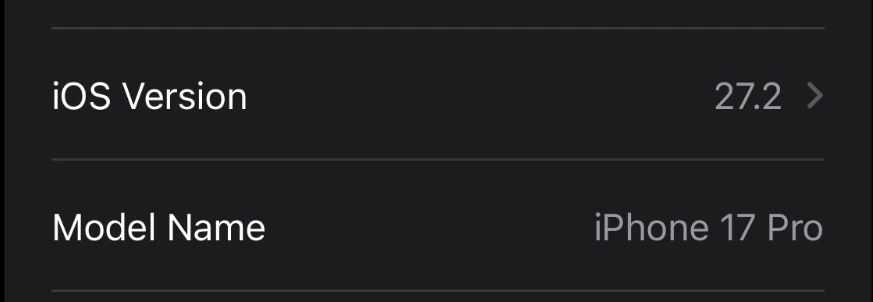
- Check the iOS Version field.
Confirm that the device is running iOS 27.2.
Apple provides additional help in its official iPhone update instructions.
What if iOS 27.2 Is Not Showing?
If iOS 27.2 doesn’t appear in Software Update, don’t immediately reset your iPhone.
Start by checking whether your device supports iOS 27.
Then:
- Connect to a reliable Wi-Fi network.
- Check Settings > General > Software Update again.
- Confirm that your iPhone isn’t restricted by device-management settings.
- Turn off Beta Updates if you intend to use the regular public release.
- Restart your iPhone normally.
- Check for any earlier required update.
Apple notes that some VPN or proxy configurations can interfere with access to update servers.
If the update still doesn’t appear on a compatible device, Apple also supports updating through a computer in certain situations.
Avoid installing unofficial firmware packages from unfamiliar websites.
Does iOS 27.2 Fix Battery Drain?
Apple’s iOS 27.2 release includes bug fixes and security improvements.
However, that doesn’t mean every battery-drain problem reported on an earlier iOS version is automatically resolved.
Battery performance depends on several factors, including:
- Background app activity.
- Device temperature.
- Cellular signal strength.
- Display usage.
- Battery health.
- Tasks performed after an update.
Immediately after installing new software, your iPhone may continue background processing for some time.
That can temporarily affect battery life or temperature.
If your battery drains unusually quickly after updating, check Settings > Battery for relevant insights and abnormal activity.
For detailed troubleshooting, read our iOS 27.0.1 Battery Drain guide. Its general battery-diagnostic methods also help when investigating post-update battery usage, although it addresses an earlier iOS release.
Don’t assume iOS 27.2 permanently improves or worsens battery life without testing your own device.
Does iOS 27.2 Improve Performance?
Apple includes software and security improvements in this release, but performance changes may vary between devices.
A new update doesn’t guarantee that every iPhone becomes faster.
Factors such as free storage, battery condition, installed apps, and background activity can affect how responsive a device feels.
After installing iOS 27.2:
- Allow any post-update background tasks to finish.
- Update apps that have compatible releases.
- Check available storage if performance feels unusually slow.
- Restart your iPhone if an application becomes unresponsive.
- Monitor whether the issue persists.
If Safari is the only app experiencing problems, read our iPhone Safari Not Loading Websites guide.
If multiple apps cannot connect through mobile data, our iPhone Cellular Data Not Working guide covers network-specific troubleshooting.
It’s better to investigate the affected feature than assume the entire software update is defective.
Should You Update to iOS 27.2?
For most users with compatible iPhones, updating to a stable Apple release is generally sensible, particularly because of the included security improvements.
However, the decision depends on your device and requirements.
Reasons to Update
- You want the latest available security fixes.
- You use Siri AI and want the new improvements.
- You want contextual suggestions in Messages.
- You use Shared Albums or other updated Apple apps.
- You prefer staying on Apple’s current supported software.
Reasons to Check First
- Your iPhone is managed by an employer or organization.
- You depend on an app that hasn’t confirmed compatibility.
- Your phone has very little available storage.
- You’re in the middle of an important task and cannot risk installation downtime.
- Your device has an unresolved hardware issue.
If you rely on your iPhone for essential work, back it up and confirm that your most important applications are compatible before starting.
There’s no need to rush through an installation without preparing your device.
However, delaying important security updates indefinitely can leave known vulnerabilities unpatched.
Frequently Asked Questions
Is iOS 27.2 Available for iPhone 11?
Yes. iPhone 11 models are included in Apple’s iOS 27 compatibility list. However, they don’t support every Apple Intelligence or Siri AI capability.
Does iOS 27.2 Include Siri AI?
Yes. On eligible devices, it expands Siri AI with improved conversation memory, more personal context, and additional language support.
Why Is Siri AI Missing After Updating?
Siri AI requires compatible hardware, languages, regions, and account eligibility. It isn’t available on every iPhone that can install iOS 27.2.
Does iOS 27.2 Fix Battery Problems?
Apple includes bug fixes, but that doesn’t establish a universal battery-drain fix. Battery performance can vary, and background processing may temporarily affect power use after installation.
How Big Is the iOS 27.2 Update?
The displayed download size can vary by device and existing software version. Check your own Software Update screen for the applicable size.
Does iOS 27.2 Have Security Updates?
Yes. Apple published security fixes addressing vulnerabilities in several system components, including Messages, Siri, WebKit, and other frameworks.
Final Thoughts
The iOS 27.2 new features make this more than a small maintenance update.
The biggest improvements focus on Siri AI, especially its ability to remember previous interactions and use additional personal context.
Suggested Actions in Messages, improved Shared Albums, and more convenient Siri controls could also make everyday tasks easier on supported iPhones.
Other improvements to Podcasts, FaceTime, Shortcuts, and Apple’s entertainment apps add value across different parts of the system.
Importantly, iOS 27.2 includes security updates, making it relevant even for users who don’t have access to the latest Apple Intelligence features.
Before upgrading, check your iPhone’s compatibility, available storage, and backup status.
After installing the update, give the device time to complete background processing before evaluating battery life and performance.
For more troubleshooting, visit our guides on iOS 27.0.1 Battery Drain, iPhone Safari Not Loading Websites, and iPhone Cellular Data Not Working.
Last updated: October 27, 2026.
Official Apple References
- Apple: Siri AI Expands to More Languages
- Apple Support: iOS 27.2 Security Content
- Apple Support: What’s New in Shortcuts for iOS 27.2
- Apple Support: Suggested Actions in Messages
- Apple Support: iOS 27 Compatible iPhones
- Apple Support: How to Update Your iPhone
- Apple Support: Image Playground and SynthID