
Getting too many messages from a group chat you no longer want to be part of? Maybe your phone keeps buzzing, the conversation has become irrelevant, or you were added to a group without expecting it.
If you’re wondering how to leave a group text on iPhone, Apple makes it relatively simple, but only for certain types of group conversations.
You can leave an iMessage group when there are at least three other participants and everyone is using iMessage.
However, if the group includes Android users, uses SMS/MMS or RCS, or has too few participants, you generally won’t see the same Leave This Conversation option.
Fortunately, you can still mute unwanted notifications and, for certain group messages, use blocking controls.
This guide explains how to leave a group text, why the option may be unavailable, and what to do instead.
Quick Answer: How to Leave a Group Text on iPhone
To leave an eligible iMessage group:
- Open the Messages app.
- Select the group conversation you want to leave.
- Tap the group name or participant icons at the top.
- Scroll down.
- Tap Leave This Conversation.
- Confirm by tapping Leave Conversation, if prompted.
That’s it.
Your iPhone should remove you from the active group conversation.
Important: This option is available only for a group iMessage with at least four people total, including you, and everyone must be using iMessage.
If the option isn’t available, continue reading. The next sections explain why and what alternatives you have.
For Apple’s official instructions, see Leave a group text message thread on your iPhone or iPad.
Table of Contents
Can You Leave Any Group Text on iPhone?
No. Not every conversation in Apple’s Messages app supports leaving the group.
The available options depend on the messaging service and the people in the conversation.
Group iMessage
Group iMessages generally appear with blue message bubbles.
They use Apple’s iMessage service and support features such as group names, mentions, and leaving eligible conversations.
You can leave when all participants use iMessage and at least three other people remain in the conversation.
Group SMS or MMS
Traditional SMS and MMS messages generally appear with green bubbles.
They use carrier messaging services rather than Apple’s iMessage system.
These conversations don’t provide the same group-leaving feature.
Group RCS
RCS is a newer messaging standard supported on compatible iPhones and carriers.
It can provide features such as higher-quality media, typing indicators, and delivery receipts.
However, group RCS conversations generally don’t provide the same Leave This Conversation feature as an eligible iMessage group.
A green bubble alone doesn’t tell you whether the conversation is SMS, MMS, or RCS.
Apple explains these differences in its official group messaging guide.
How to Leave a Group Text on iPhone
If your group meets Apple’s requirements, follow these steps.
Step 1: Open the Messages App
Find the Messages app on your iPhone and open it.
Look through your conversations until you find the group you want to leave.
You can use Messages search if the conversation isn’t immediately visible.
Step 2: Open the Group Conversation
Tap the group to open it.
Check that it’s the correct conversation before proceeding.
If you belong to several groups with similar names, review the participants first.
Step 3: Tap the Group Name or Icons
At the top of the conversation, you’ll see the group name, participant icons, or related contact information.
Tap that area to open the conversation details.
Depending on your iOS version, this screen may contain participant information, shared content, notification settings, and group management options.
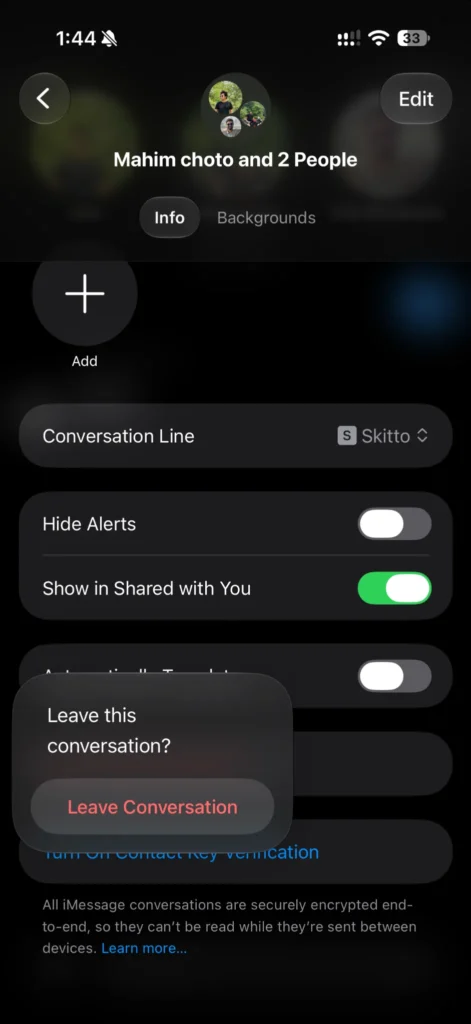
Step 4: Select Leave This Conversation
Scroll down in the group details.
If the group is eligible, you’ll find Leave This Conversation.
Tap it.
You may be asked to confirm your decision.
Choose Leave Conversation if you want to proceed.
Step 5: Confirm You’ve Left
After leaving, the conversation should no longer function as an active group chat for you.
Other participants can continue communicating without you.
You don’t need to reset your iPhone, uninstall Messages, or disable iMessage.
If the option isn’t displayed, don’t assume something is broken. Check the requirements explained below.
Why Can’t I Leave a Group Text on My iPhone?
This is one of the most common questions about group messaging.
You may open the group information screen and find that Leave This Conversation is missing or unavailable.
There are several possible explanations.
1. There Are Only Three People in the Group
Apple requires at least three other participants before you can leave a group iMessage.
That means the conversation must have at least four people, including you.
For example:
- You + three friends: Leaving may be available.
- You + two friends: Leaving isn’t available through this feature.
This rule applies even if all three participants use iPhones.
If your conversation is too small, ask the other participants to start a new chat without you.
2. Someone in the Group Uses Android
If one participant isn’t using iMessage, the group generally uses a different messaging service.
This can prevent the iMessage-specific Leave This Conversation option from appearing.
Instead, you may need to mute the conversation or use an available blocking option.
If you’re having trouble sending texts to Android users, see our iPhone Not Sending Text Messages to Android guide.
3. The Conversation Uses SMS, MMS, or RCS
The Messages app supports different messaging technologies.
Not all of them provide the same group-management features.
A group can look similar to an iMessage conversation while using another messaging service.
You cannot force an SMS/MMS/RCS group to display the iMessage Leave Conversation option simply by changing a setting on your own phone.
4. iMessage Isn’t Active for Everyone
An Apple device doesn’t automatically mean that the conversation is using iMessage.
The participant must also have iMessage available and enabled.
You can review your own setting at:
Settings → Apps → Messages → iMessage
If iMessage isn’t working for one or more members, the group may use another messaging service.
Don’t turn iMessage off and on repeatedly just to make a group-leaving option appear.
If your iMessages are failing to send, our iMessage Not Delivered guide covers the relevant troubleshooting steps.
How to Leave a Group Text With Android Users
If you’re in a mixed iPhone and Android group, the iMessage-specific leave feature generally won’t be available.
You still have several practical choices.
Option 1: Mute the Group Using Hide Alerts
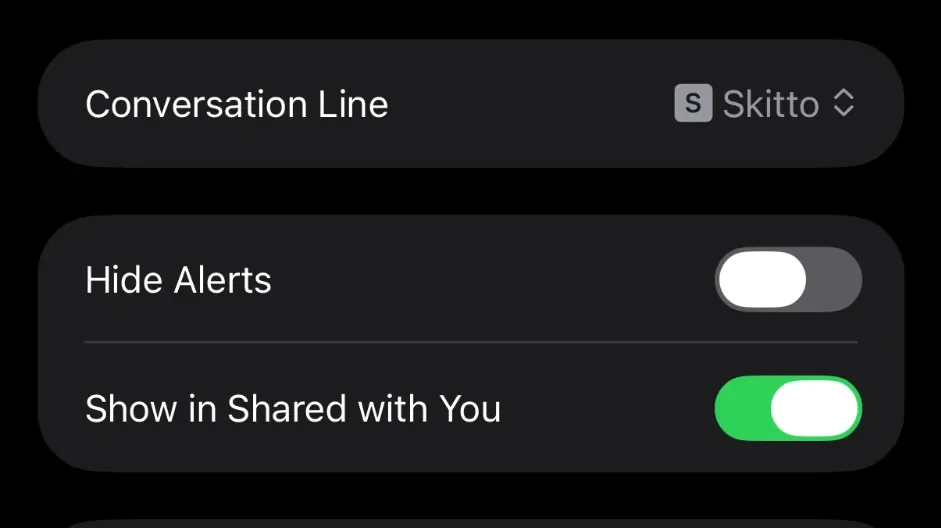
This is usually the simplest solution if you don’t want to receive repeated notifications.
- Open Messages.
- Select the unwanted group conversation.
- Tap the group name or participant icons at the top.
- Find Hide Alerts.
- Turn it on.
This stops ordinary notifications for the selected conversation without disabling notifications for every message on your iPhone.
You can also swipe left on a conversation in the Messages list and use the available alerts control.
Remember: Muting doesn’t remove you from the conversation.
New messages can still arrive, and you’ll be able to read them when you open Messages.
If your iPhone isn’t showing notifications even for conversations you want to hear from, see our iPhone Notifications Not Working guide.
Option 2: Delete and Block an Unwanted MMS or RCS Group
On supported iOS versions, Apple provides a Delete and Block This Conversation option for certain MMS and RCS group messages.
This can be useful for unwanted or spam conversations.
To check:
- Open the MMS or RCS group in Messages.
- Tap the group name or participant details.
- Look for Delete and Block This Conversation.
- Review the option before confirming.
Apple documents this feature in its Send a group text message guide.
This is different from leaving an iMessage group.
It is intended to block an unwanted group conversation, not to send an ordinary departure notice to the other participants.
If you want to keep receiving messages from the people involved, consider muting instead.
Option 3: Ask the Group to Start a New Conversation
If the group is legitimate but you no longer need to participate, explain that you’d prefer to be excluded from future messages.
The other participants can start a new conversation without your number.
This is often the simplest solution for smaller groups that don’t support leaving.
It also avoids changing unrelated messaging settings.
Does Deleting a Group Text Remove You From the Group?
No, not necessarily.
Deleting a conversation from your Messages list is different from formally leaving it.
Deleting a Conversation
Deleting a conversation removes the local conversation from your list, subject to Apple’s message deletion and synchronization behavior.
It doesn’t automatically change the membership of a traditional SMS, MMS, or RCS group.
If participants continue sending messages, the conversation may appear again.
Leaving an iMessage Group
Leaving an eligible iMessage group changes your participation in that conversation.
The remaining members can continue communicating.
For a group you simply don’t want to see, muting is often a less disruptive alternative.
What Happens When You Leave an iMessage Group?
When you leave an eligible iMessage conversation, you stop participating in that existing group chat.
The other participants can continue messaging one another.
Messages typically show a system indication that a participant has left.
Will Other People Know You Left?
Yes, they may be able to see that you left the group.
Leaving isn’t designed to be an invisible action.
If you want to avoid drawing attention to your departure, muting is usually a better choice.
Will You Still Receive Messages?
You shouldn’t continue receiving new messages as an active participant in the group you’ve left.
However, a participant may be able to add you to another eligible conversation or start a new group.
Leaving one conversation does not permanently block those people from contacting you.
Do You Lose Access to Shared Projects?
If the group was used to collaborate on content in another app, leaving the Messages conversation doesn’t necessarily revoke access to the shared project.
Access to a shared document, note, or other collaborative item may be controlled separately.
Review the relevant app’s sharing settings if you also want to stop participating in the project.
How to Mute a Group Text Without Leaving
Sometimes leaving isn’t necessary.
You may want to stay in a family, work, or study group but reduce the number of interruptions.
Apple’s Hide Alerts setting provides a useful alternative.
To use it:
- Open Messages.
- Select the group.
- Tap the group details.
- Enable Hide Alerts.
Your iPhone should stop providing ordinary alerts for the selected conversation.
You can return to the group whenever you want.
Can You Still Receive Mentions?
In supported iMessage groups, someone may mention you directly.
Depending on your notification settings, a mention can still generate an alert even when the conversation is muted.
Review Settings → Apps → Messages → Notify Me if that option is available and you want to adjust mention notifications.
Don’t assume Hide Alerts prevents every possible notification in every situation.
Can You Rejoin a Group Text After Leaving?
You may be able to join a new or existing eligible iMessage conversation if another participant adds you and the group-management requirements are met.
However, you shouldn’t rely on being able to reverse a departure yourself with a single button.
If you’ve left a group by mistake, ask an existing participant to help.
You can also create a new group conversation with the people you want to message.
Frequently Asked Questions
How do I leave a group text on iPhone with three people?
If the conversation contains only three participants total, including you, the iMessage Leave This Conversation feature isn’t available. You can mute the chat or ask the other people to create a new conversation without you.
Why is Leave This Conversation greyed out?
The group may have too few participants or may not be using an eligible iMessage conversation. Verify that there are at least three other people and everyone uses iMessage.
Can I leave a group text with Android users?
Generally, not through Apple’s iMessage Leave Conversation feature. Mixed-device groups using SMS/MMS/RCS have different controls. Muting or an available blocking feature may help.
Can I leave a group text without anyone knowing?
Leaving an eligible iMessage group can be visible to other participants. If you simply want fewer interruptions, use Hide Alerts instead.
Does Hide Alerts remove me from a group?
No. Hide Alerts mutes notifications for that conversation. You remain part of the chat and can read new messages.
Can someone add me back after I leave?
Depending on the conversation and its membership settings, another participant may be able to add you again or create a new group including you.
Does deleting a group conversation stop future texts?
Not necessarily. Ordinary deletion doesn’t guarantee that additional messages won’t arrive. Use the available group-management or blocking controls where appropriate.
Why can’t I leave a green-bubble group?
Green-bubble conversations use SMS, MMS, or RCS instead of iMessage. The group-leaving feature documented for iMessage isn’t generally available for those messaging types.
Can I leave a group text on iPhone 17 Pro?
Yes. The iPhone 17 Pro supports leaving eligible group iMessage conversations. The same participant-count and messaging-service requirements apply.
Final Thoughts
If you want to know how to leave a group text on iPhone, the most important thing is identifying the type of conversation you’re in.
For an iMessage group with at least four participants, including yourself, open the group details and select Leave This Conversation.
If that option is unavailable, check whether the group is too small or uses SMS, MMS, or RCS.
You can still mute unwanted notifications with Hide Alerts, consider available blocking controls for unwanted group messages, or ask participants to create a new conversation without you.
The best option depends on whether you want to leave completely, stop notifications, or block an unwanted conversation.