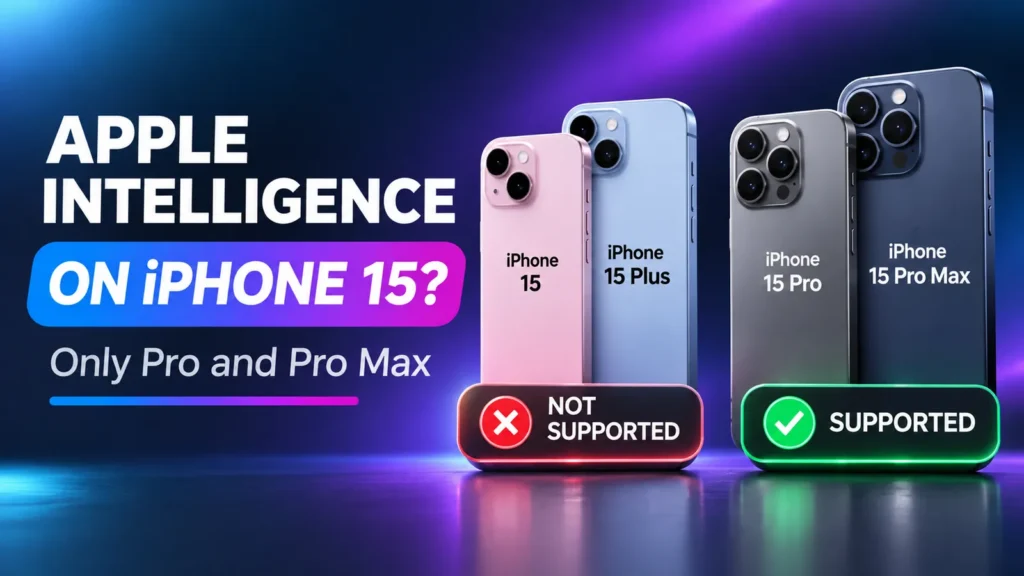
Does the iPhone 15 support Apple Intelligence? The answer depends on which iPhone 15 model you own.
Only the iPhone 15 Pro and iPhone 15 Pro Max support Apple Intelligence. The standard iPhone 15 and iPhone 15 Plus do not, even after updating to iOS 27.
This is an important distinction because all four models belong to the same iPhone generation, but their hardware differs.
In this guide, The Synced Desk explains Apple Intelligence iPhone 15 compatibility, why some models are excluded, which AI features work on the Pro versions, and what you can do if your iPhone doesn’t support Apple’s built-in AI.
Table of Contents
Quick Answer: Does iPhone 15 Have Apple Intelligence?
Apple Intelligence is supported on two of the four iPhone 15 models.
| iPhone model | Apple Intelligence | Processor |
|---|---|---|
| iPhone 15 | Not supported | A16 Bionic |
| iPhone 15 Plus | Not supported | A16 Bionic |
| iPhone 15 Pro | Supported | A17 Pro |
| iPhone 15 Pro Max | Supported | A17 Pro |
Apple’s official compatibility list includes iPhone 15 Pro, iPhone 15 Pro Max, and eligible newer iPhone models.
It does not include the standard iPhone 15 or iPhone 15 Plus.
The key takeaway: Updating an iPhone 15 or iPhone 15 Plus to iOS 27 will not unlock Apple Intelligence. The limitation is hardware-based, not a missing Settings option.
Source: Apple’s official Apple Intelligence requirements.
Why Doesn’t the Regular iPhone 15 Support Apple Intelligence?
The standard iPhone 15 and iPhone 15 Plus use Apple’s A16 Bionic processor, while the iPhone 15 Pro and Pro Max use the newer A17 Pro chip.
Apple Intelligence relies on demanding AI-processing capabilities, including on-device machine learning.
The A17 Pro is part of the hardware platform Apple selected for Apple Intelligence support. The regular iPhone 15’s hardware does not meet Apple’s published compatibility requirements.
That doesn’t mean the standard iPhone 15 is unable to perform any intelligent or automated tasks.
It still supports everyday features such as Siri, dictation, predictive text, camera processing, and other capabilities included with iOS.
However, those functions should not be confused with the specific Apple Intelligence feature set.
Is this an iOS 27 software limitation?
No.
The limitation existed before iOS 27 and is tied to the supported iPhone hardware.
Installing the newest compatible iOS release can provide security improvements and other software features, but it cannot change the underlying chip.
There is also no official Apple setting that converts an unsupported iPhone into an Apple Intelligence-compatible device.
Does iPhone 15 Pro Support Apple Intelligence in iOS 27?
Yes.
The iPhone 15 Pro and iPhone 15 Pro Max support Apple Intelligence under Apple’s current iOS 27 requirements.
The next generation of Apple Intelligence is integrated into supported applications and experiences rather than relying on a single universal switch.
Eligible iPhone 15 Pro users can access compatible features when their devices meet the required software, storage, language, and regional conditions.
Examples of Apple Intelligence capabilities include:
- Writing Tools for working with text.
- AI-powered photo features.
- Image Playground and Genmoji.
- Supported Mail and Messages assistance.
- Intelligent features for productivity and organization.
- Siri AI (Beta), where available.
Individual features can have different language, regional, software, or usage requirements. Support for Apple Intelligence does not mean that every feature is available in every location or circumstance.
Is Apple Intelligence free on iPhone 15 Pro?
Apple Intelligence includes features available on eligible iPhones without requiring a separate subscription just to activate the basic system.
However, Apple applies usage limits to certain features that use server-side models, and it has announced plans for expanded paid access.
Check Apple’s current terms for the particular feature you intend to use.
How to Check Which iPhone 15 Model You Have
If you’re unsure whether your iPhone is the regular, Plus, Pro, or Pro Max version, you can check directly in Settings.
Step 1: Open About
- Open Settings.
- Tap General.
- Select About.
- Find Model Name.
Your phone should identify the model you own.
Step 2: Match your model
If the model name says:
- iPhone 15: Apple Intelligence is not supported.
- iPhone 15 Plus: Apple Intelligence is not supported.
- iPhone 15 Pro: Apple Intelligence is supported.
- iPhone 15 Pro Max: Apple Intelligence is supported.
You don’t need to look up the serial number or share your IMEI to make this determination.
The model name is enough.
Privacy tip: If you’re asking someone for help identifying the phone, share only the model name. Avoid posting screenshots that expose your serial number, IMEI, or other device identifiers.
How to Access Apple Intelligence on iPhone 15 Pro
If you have an iPhone 15 Pro or iPhone 15 Pro Max, Apple Intelligence should be available when the relevant requirements are met.
Follow these checks.
1. Install a compatible iOS version
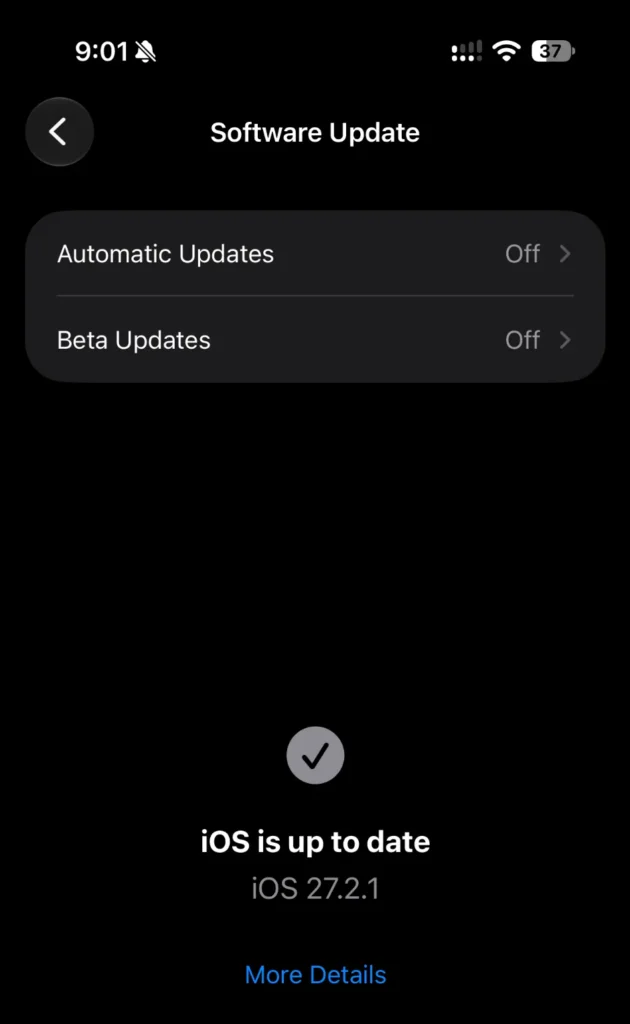
Open Settings > General > Software Update.
Check whether your iPhone is running iOS 27 or whether a compatible newer update is offered.
Back up important data before installing an update.
Apple’s iOS 27 guidance says the next-generation Apple Intelligence features are integrated automatically into eligible devices in supported languages and regions.
If you’re following an older iOS 18 or iOS 26 guide, the Settings instructions may look different.
For additional information about recent changes, see our iOS 27.2 New Features guide.
2. Check device and Siri language
Apple requires your device language and Siri language to match a supported language.
To check your device language:
- Open Settings.
- Select General > Language & Region.
- Review your preferred language.
To check Siri:
- Return to Settings.
- Open Siri.
- Select Language.
- Review the selected language.
English (United States) is a supported option for US users.
However, Apple Intelligence supports several languages, so changing everything to English is not always necessary.
3. Check available storage
Apple’s November 2026 requirements list up to 8 GB of on-device storage for Apple Intelligence models on eligible iPhones such as the iPhone 15 Pro and Pro Max.
Temporary requirements can be higher when AI models are being replaced during software updates.
To check your available storage:
- Open Settings.
- Tap General.
- Select iPhone Storage.
- Review the available space.
If storage is nearly full, consider offloading unused applications or removing downloads you no longer need.
Don’t delete personal files without a backup.
For more help, see our iPhone System Data Taking Up Storage troubleshooting guide.
4. Try a supported Apple Intelligence feature
You can test whether supported AI features are available without searching for a single master toggle.
For example:
- Open Notes.
- Create a note using sample text.
- Select the text.
- Look for a supported Writing Tools option.
- Try proofreading or another available action.
The specific interface depends on the installed version and whether Siri AI is enabled.
You can also explore supported photo tools and other Apple Intelligence features within their relevant applications.
Can iPhone 15 Pro Use Siri AI in iOS 27?
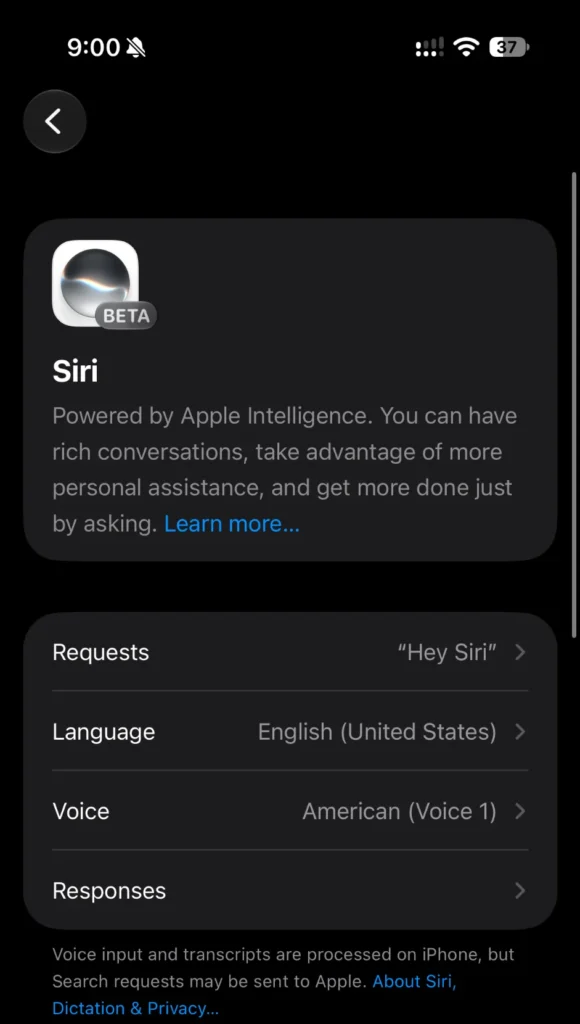
Yes, subject to Apple’s beta requirements.
The iPhone 15 Pro and iPhone 15 Pro Max are eligible for Siri AI (Beta) under Apple’s current compatibility rules.
Siri AI is part of the next-generation Apple Intelligence experience, but it has a separate activation process.
On an eligible iPhone:
- Open Settings.
- Tap Siri.
- Look for Try Siri AI (Beta).
- Follow the instructions if the option is available.
- Complete any required activation or waitlist process.
Apple initially supports Siri AI in English, French, Japanese, Korean, Portuguese, and Spanish.
It also has additional regional and age restrictions, so eligibility for Apple Intelligence does not automatically guarantee immediate Siri AI beta access.
Refer to Apple’s Siri AI setup guide for the current requirements.
If ordinary Siri isn’t working, see our iPhone Siri Not Working guide for separate troubleshooting.
Can You Get Apple Intelligence on iPhone 15 or 15 Plus?
There is no supported method to install the built-in Apple Intelligence feature set on the regular iPhone 15 or iPhone 15 Plus.
You cannot enable it by:
- Installing iOS 27.
- Changing your Apple Account region.
- Switching your Siri language to English.
- Downloading a third-party configuration profile.
- Installing an application that claims to unlock Apple’s on-device AI.
- Resetting your iPhone.
These actions do not change Apple’s device compatibility requirements.
Be cautious about websites promising to unlock Apple Intelligence on unsupported hardware.
Some may suggest unauthorized modifications, unreliable software, or invasive changes that create security and stability risks.
Can you use ChatGPT on the regular iPhone 15?
Yes, you can use compatible third-party AI services, including the ChatGPT app or supported browser versions, without requiring Apple Intelligence hardware support.
However, using ChatGPT as a separate service is not the same as enabling Apple’s built-in Apple Intelligence framework.
The app may help you write, brainstorm, summarize text, or ask questions, but it doesn’t automatically add Apple’s integrated Genmoji, Writing Tools, or Siri AI features to an unsupported iPhone.
Other compatible AI applications may provide similar independent functionality.
If you’re satisfied with your current iPhone 15, using an external AI service can be a practical alternative to upgrading solely for Apple Intelligence.
Apple Intelligence vs. Regular Siri on iPhone 15
One common misunderstanding is that Siri and Apple Intelligence are identical.
They are related, but they are not the same system.
On the regular iPhone 15, Siri continues to provide supported voice-assistant functionality, such as setting timers, making calls, sending messages, and handling compatible requests.
The redesigned Siri AI experience relies on Apple Intelligence-compatible hardware.
That is why the regular iPhone 15 can still use Siri while lacking the newer Siri AI experience.
An iPhone 15 Pro or Pro Max can use the supported Apple Intelligence features and may also access Siri AI (Beta) when the additional requirements are met.
Should You Upgrade Your iPhone 15 Just for Apple Intelligence?
That depends on how you use your phone.
Apple Intelligence can be useful if you frequently work with written content, use AI-powered photo tools, or want deeper AI integration across supported applications.
However, upgrading just for a single AI feature may not be worthwhile for everyone.
Before buying another phone, ask yourself three questions.
Do you need Apple’s system-integrated AI features?
If you’re specifically interested in Genmoji, built-in Writing Tools, Apple’s intelligent photo features, or Siri AI, you’ll need an eligible iPhone.
Could a separate AI app meet your needs?
If your main goal is asking questions, writing emails, generating ideas, or summarizing documents, an independent AI service may already provide much of what you need.
Are other hardware improvements important?
Battery health, storage capacity, camera quality, performance, and the overall condition of your phone can matter more than one software feature.
There is no need to replace a functioning iPhone 15 solely because it doesn’t support Apple Intelligence.
Apple Intelligence Not Working on iPhone 15 Pro? Check These First
If you own a supported Pro model but can’t access the expected features, use this checklist.
Check your exact model: Confirm that Settings > General > About identifies an iPhone 15 Pro or Pro Max.
Update iOS: Install the latest compatible stable release.
Review languages: Device language and Siri language must meet Apple’s requirements.
Check storage: Ensure enough free capacity is available for system and AI resources.
Check regional availability: Some features aren’t available in all locations.
Allow downloads to complete: Depending on the feature, additional on-device resources may need to download.
Review restrictions: Screen Time or organizational device-management settings may limit specific functionality.
Restart if necessary: A normal restart may help with temporary issues, but it won’t bypass compatibility requirements.
If downloads repeatedly stall while connected to Wi-Fi, see our iPhone Wi-Fi Keeps Disconnecting guide.
For persistent failures on supported hardware, Apple’s official support resources are the best place to check for additional requirements.
Frequently Asked Questions
Does iPhone 15 support Apple Intelligence?
The regular iPhone 15 does not support Apple Intelligence. Within the iPhone 15 family, only the iPhone 15 Pro and iPhone 15 Pro Max are compatible.
Does iPhone 15 Plus have Apple Intelligence?
No. The iPhone 15 Plus uses the A16 Bionic chip and is excluded from Apple’s supported Apple Intelligence device list.
Does iPhone 15 Pro have Apple Intelligence?
Yes. Apple officially includes the iPhone 15 Pro among its supported Apple Intelligence devices. Feature availability depends on software, language, and regional requirements.
Does iPhone 15 Pro Max support Siri AI?
Yes. The iPhone 15 Pro Max meets Apple’s device requirements for Siri AI (Beta) on iOS 27, although activation and regional restrictions still apply.
Will iOS 27 add Apple Intelligence to iPhone 15?
No. Updating the standard iPhone 15 to iOS 27 will not make its hardware compatible with Apple Intelligence.
Why can iPhone 15 Pro use Apple Intelligence but iPhone 15 cannot?
The iPhone 15 Pro contains the A17 Pro chip and is included in Apple’s supported hardware list. The regular iPhone 15 uses an A16 Bionic chip and is not supported.
Can I download Apple Intelligence from the App Store?
No. Apple’s built-in Apple Intelligence system is integrated into supported devices and operating systems rather than being an ordinary standalone app that can add compatibility to unsupported phones.
Can I use ChatGPT on iPhone 15 without Apple Intelligence?
Yes. Compatible third-party AI apps and websites can work independently of Apple’s built-in Apple Intelligence features.
Final Verdict
The Apple Intelligence iPhone 15 compatibility question has a straightforward answer:
- iPhone 15: Not supported.
- iPhone 15 Plus: Not supported.
- iPhone 15 Pro: Supported.
- iPhone 15 Pro Max: Supported.
Apple Intelligence eligibility depends on the model’s hardware, not simply whether iOS 27 is installed.
If you own an iPhone 15 Pro or Pro Max, check your software version, supported language, region, and available storage to access eligible features.
If you own a regular iPhone 15 or 15 Plus, you can continue using supported Siri functions and third-party AI applications, but you cannot officially unlock the built-in Apple Intelligence system.
The Synced Desk editorial note: This compatibility guide was researched using Apple’s published support documentation and device specifications. It does not claim hands-on testing of all four iPhone 15 models.
Last fact-checked: November 19, 2026.
Official Sources
- Apple Support: Get Started With the Next Generation of Apple Intelligence
- Apple: Get Started With Apple Intelligence on Your iPhone
- Apple: iPhone 15 Technical Specifications
- Apple: iPhone 15 Plus Technical Specifications
- Apple: iPhone 15 Pro Technical Specifications
- Apple Support: How to Get Siri AI