
iPhone Duo screen cracking issues have emerged shortly after Apple’s first foldable iPhone reached customers. Some early owners have reported cracks along the inner display’s central fold, sometimes accompanied by a popping sound, unusual hinge resistance, or bright lines across the screen.
Apple acknowledged the problem on October 26, 2026, saying it affects a small number of devices. The company has directed affected customers to contact AppleCare for replacement assistance.
If your iPhone Duo’s inner display has physically cracked, don’t try to fix it with a software reset or by forcing the hinge. Stop folding the device, document the damage if it’s safe to do so, and contact Apple Support.
This guide explains the reported symptoms, Apple’s response, safe handling precautions, and how to prepare your iPhone Duo for repair or replacement.
Last reviewed: November 5, 2026.
Table of Contents
Quick Answer: What Should You Do if Your iPhone Duo Screen Cracks?
If you discover a crack or a damaged area around the hinge:
- Stop repeatedly opening or closing the device.
- Don’t press on the cracked area or attempt to straighten the hinge.
- Photograph the visible damage if doing so is safe.
- Back up your data if the phone remains usable.
- Contact AppleCare or an Apple Authorized Service Provider.
- Explain when the damage appeared and whether the hinge felt unusually stiff.
- Follow Apple’s instructions for inspection, repair, or replacement.
Apple has acknowledged an inner-display issue affecting a small number of iPhone Duo units. According to its statement, affected owners should contact AppleCare for replacement assistance.
You can begin at Apple Support.
What Is the iPhone Duo Screen Cracking Issue?
The iPhone Duo features a foldable inner display that opens into a larger screen.
Following its October 23, 2026 release, several owners reported damage appearing along the central fold.
In some cases, users described hearing a popping or cracking noise while opening the device. Others reported that the hinge suddenly felt more resistant than usual.
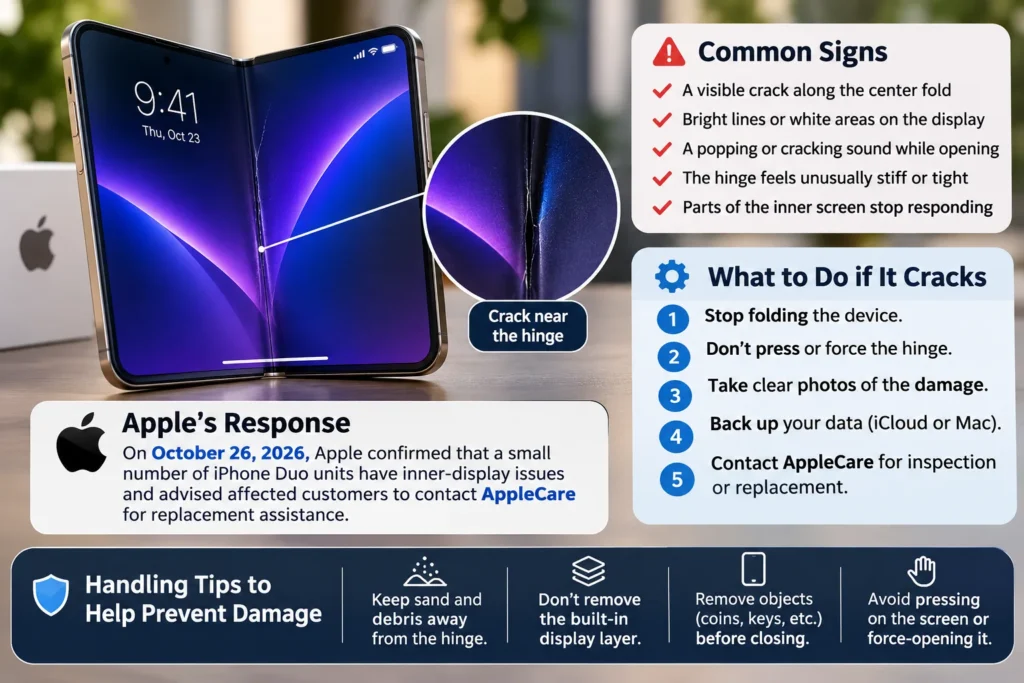
The visible damage has included:
- A crack running vertically along the center fold.
- Bright horizontal or vertical lines across the inner display.
- White or discolored areas near the hinge.
- Parts of the inner screen becoming unusable after the damage appeared.
These symptoms have appeared in multiple independently reported cases.
However, this does not establish that every iPhone Duo has a defective hinge or that all foldable displays will eventually develop cracks.
Apple maintains that the issue affects a small number of units.
For users whose display has stopped working without any visible physical damage, our iPhone Duo Inner Screen Not Working guide addresses a different troubleshooting situation.
Has Apple Acknowledged the iPhone Duo Display Problem?
Yes.
On October 26, 2026, Apple confirmed to several technology publications that it was aware of an issue affecting the inner display on a small number of iPhone Duo devices.
Apple advised customers experiencing the problem to contact AppleCare for a replacement.
According to a MacRumors report published October 30, Apple also provided internal guidance to Apple Stores and authorized service providers.
Technicians were instructed to inspect affected devices and determine the appropriate repair or replacement through normal service procedures.
As of November 5, 2026, Apple has not announced a general iPhone Duo recall or a separate public repair program specifically for this issue.
That distinction matters.
An acknowledged defect does not mean that every iPhone Duo is being recalled. Affected customers should contact Apple and have their particular device assessed.
Why Are Some iPhone Duo Screens Cracking?
The exact underlying cause has not been publicly confirmed by Apple.
Some early reports suggest a connection between the hinge mechanism and stress on the flexible inner display.
Repair specialists have examined the internal hinge structure and identified potential pressure points where several components meet.
One possibility discussed by iFixit involves a component near the center of the hinge that may not move as intended during folding.
However, this remains a proposed explanation, not a confirmed engineering finding from Apple.
It would therefore be inaccurate to say that every reported crack is caused by the same defective component.
Could a stiff hinge be a warning sign?
Possibly.
Some affected owners reported unusual resistance just before the inner display cracked.
If your iPhone Duo suddenly becomes difficult to open or close, don’t force it.
Stop manipulating the hinge and request professional assistance.
A stiff hinge is not proof that your display will crack, but a sudden change in its behavior deserves attention.
Normal Screen Crease vs. Actual Display Damage
A foldable display may show a visible crease around the area where it bends.
A normal crease and a physically damaged display are not necessarily the same thing.
| What you notice | Recommended action |
|---|---|
| Consistent fold line without damage | Follow normal handling guidance |
| New visible crack along the fold | Stop folding and contact Apple |
| Sudden hinge resistance | Don’t force the hinge; request assessment |
| Bright lines or white areas on the screen | Seek Apple service |
| Inner screen stops responding | Check for physical damage before software troubleshooting |
If the screen looks damaged or the hinge behaves abnormally, avoid repeatedly testing it.
For a separate issue involving an unresponsive display without visible cracking, see our iPhone Touchscreen Not Working guide.
What to Do if Your iPhone Duo Screen Has Cracked
1. Stop Folding the Device
Once you notice a physical crack or unusual resistance, avoid repeatedly opening and closing the phone.
Additional movement could place more stress on an already damaged area.
Do not attempt to push the screen back into place or straighten the hinge yourself.
If the phone becomes unusually hot, emits an odor, or shows signs of battery damage, stop using and charging it and seek professional assistance.
2. Document the Problem
If it is safe, use another device to take clear photographs of:
- The visible crack or damaged display area.
- Any bright lines or unusual discoloration.
- The central hinge area.
- Any external damage that may help explain what happened.
Keep your purchase receipt or order confirmation available.
Make a short note of when the problem first appeared and whether it followed normal opening or closing.
This information can help Apple Support understand the circumstances.
Avoid posting your serial number, purchase documents, or personal information publicly.
3. Back Up Your iPhone Duo
If the device is still working safely, create a backup before repair or replacement.
To back up using iCloud:
- Connect the iPhone to Wi-Fi.
- Open Settings.
- Tap your name.
- Select iCloud → iCloud Backup.
- Tap Back Up Now.
- Keep the device connected until the backup finishes.
You can also use a compatible Mac or PC to create a computer backup.
If the screen is severely damaged, don’t repeatedly manipulate the device just to complete a backup. Explain the situation to Apple Support.
Apple’s iPhone backup instructions provide additional guidance.
4. Contact AppleCare
This is the most important step if your screen has cracked during normal use.
Visit Apple’s iPhone repair and service page.
Explain that your device is an iPhone Duo and describe the display damage.
Mention if you experienced unusual hinge resistance, a popping noise, or a crack appearing during ordinary use.
Apple may arrange an inspection, repair, or replacement, depending on its findings and the service options available in your region.
Because the iPhone Duo is a recently released device, replacement stock may vary by location.
5. Prepare the Phone for Service
Once Apple confirms your service arrangement, follow its preparation instructions.
In iOS 27 and later, Apple supports Ready for Repair or Trade In for eligible service procedures.
When directed by Apple:
- Open the Find My app.
- Select your device.
- Open its additional options.
- Choose Repair or Trade In, if available.
- Follow Apple’s instructions.
This feature can allow eligible repairs while keeping Find My enabled.
Apple also recommends completing backups and checking important iCloud syncing before service.
For the current procedure, see Prepare your iPhone for a Service Appointment.
Never give a technician your Apple Account password or device passcode. Apple states that neither Apple nor an authorized service provider will ask you to disclose those credentials.
Will Apple Replace a Cracked iPhone Duo for Free?
Apple has publicly offered replacement assistance for the acknowledged inner-display issue.
Reports indicate that affected owners do not necessarily need AppleCare+ coverage to receive a replacement for a recognized defect.
However, the final outcome depends on Apple’s inspection, the nature of the damage, applicable warranty rights, and local service policies.
A manufacturing defect is different from accidental damage caused by a drop or impact.
Do not assume every cracked screen automatically qualifies for a free replacement.
Likewise, don’t assume you must pay for a screen replacement before allowing Apple to inspect the device.
The best approach is to contact AppleCare and request an assessment of the reported inner-display issue.
How to Help Protect the iPhone Duo Inner Display
Apple provides several important handling precautions for the iPhone Duo.
Keep Sand and Grit Away From the Hinge
Apple advises keeping sand and debris away from the hinge and ensuring the hinge area is clean before opening the device.
Particles near the moving mechanism may interfere with normal operation.
Avoid using sharp objects or compressed air to remove debris.
Remove Objects Before Closing the Phone
Before folding the iPhone Duo, make sure nothing is resting on its inner display.
Coins, keys, and other hard objects can damage the screen if trapped between its two halves.
Don’t Remove the Built-In Display Layer
Apple explains that the iPhone Duo’s inner display includes a nano-texture cover layer.
This is an integral part of the display and should not be removed.
Apple also warns that applying an additional screen protector can compromise display performance.
Follow the manufacturer’s guidance rather than attempting modifications intended for conventional glass-screen phones.
Avoid Unnecessary Pressure
Do not press directly on a damaged fold or use force to overcome hinge resistance.
If the device suddenly becomes difficult to open, request service rather than experimenting with its mechanical parts.
These precautions are consistent with Apple’s iPhone handling and safety guidance.
They are sensible handling practices, but they do not guarantee prevention of a manufacturing defect.
Can a Software Update Fix iPhone Duo Screen Cracking?
No software update can physically repair a cracked display or damaged hinge.
A restart or update may resolve certain software-related display problems, but it cannot restore damaged screen layers.
If your inner display is physically cracked, prioritize Apple service.
If the screen is black without any visible cracking or hinge damage, there may be a different explanation.
Our iPhone Black Screen but Still On guide covers software and display troubleshooting for that separate symptom.
Avoid erasing your phone or attempting a factory reset solely to address a visible physical crack.
Frequently Asked Questions
Is the iPhone Duo screen cracking a widespread problem?
Apple says the issue affects a small number of units. The exact number of affected devices has not been publicly established, so it is not possible to calculate a reliable failure rate from online reports alone.
Is Apple recalling the iPhone Duo?
As of November 5, 2026, Apple has not announced a general recall for the iPhone Duo display issue. Affected customers are being directed through AppleCare and normal service channels.
Why is my iPhone Duo cracking near the hinge?
A mechanical problem involving components near the center fold has been suggested by repair specialists. Apple has not publicly confirmed the root cause.
What if my iPhone Duo makes a popping sound?
If a popping noise is accompanied by sudden resistance, visible damage, or display abnormalities, stop folding the device and contact Apple.
Not every sound necessarily indicates a defect, but unusual changes should not be ignored.
Can I replace the inner screen myself?
The inner display is a complex, flexible assembly. Attempting a home repair could cause additional damage and create safety risks.
Use Apple or an appropriately qualified authorized service provider.
Do I need AppleCare+ for a replacement?
AppleCare+ is not necessarily required when Apple recognizes a covered manufacturing defect. Eligibility and service terms should be confirmed with Apple for your particular device.
Does a cracked iPhone Duo screen mean my data is lost?
Not necessarily. Your data may remain intact even if the display is damaged. However, repair or replacement can involve erasing the device, which is why Apple recommends having a backup.
Final Thoughts
The early iPhone Duo screen cracking issues are concerning, especially for owners who encounter damage during normal use.
Apple has acknowledged an inner-display problem affecting a small number of units and has instructed affected customers to contact AppleCare.
If your screen has cracked, don’t attempt to repair the fold or force the hinge. Document the problem, protect your data if possible, and arrange an Apple assessment.
For iPhone Duo owners who haven’t experienced problems, Apple’s normal handling precautions remain the best starting point.
Editorial note: This guide is based on Apple’s published handling and service instructions, Apple’s statements reported by established technology publications, and documented early user reports. We have not physically tested an iPhone Duo or reproduced the defect.